How to set a condition where numbers or dates are "empty" in the conditions tab for processes, etc.
Answer
Set "Default" for "Numeric Value Filter Mode Selection" and "Date Filter Mode Selection" then select "Not Set" for the condition.
--
Overview
When specifying filter conditions for "View", "Process", "Control by Status", etc., the default options for numeric value and date columns are "0~", "1000~", "Today", and "FY2024". However, by selecting "Not Set" for this option, you can specify a condition for when the numeric value or date column is left blank.

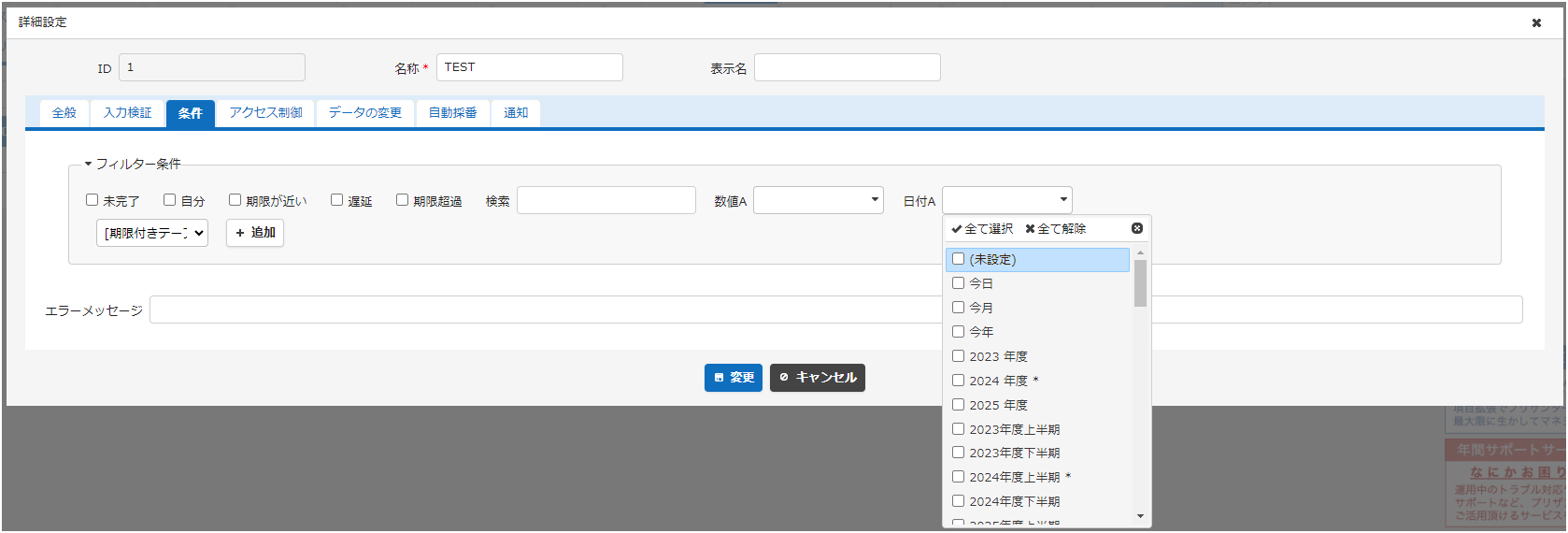
If the condition specification includes a range like the one shown below, please select "Default" under "Select Mode" for the corresponding numeric value or date column in the "Manage Table" - "Filter" tab. For instructions on how to set this, please refer to the following manual page.
Manage Table: Filter: Numeric Value Column Filter Mode Selection
Manage Table: Filter: Date Column Filter Mode Selection


Related Column
- Manage Table: Filter: Numeric Value Column Filter Mode Selection
- Manage Table: Filter: Date Column Filter Mode Selection
- Manage Table: View
- FAQ: Using the process function to create workflows (approval processes) such
- FAQ: Using the "Control by Status" function to change the state of a column,
- Manage Table
- Manage Table: Filter