Skip to content

How can I send an email with an attachment from the editing screen?

Answer

Please use the "Email Sending API" and "Attachment Retrieval API" in the "Script".


Overview

This is a sample code that uses the "Email Sending API" and "Attachment Retrieval API" to send an email with a file registered in the "Attachments column" (AttachmentsA) attached.

Cautions

  1. Pleasanter version 1.5.0.0 and later had a bug that corrupted attached files. This bug has been fixed in version 1.5.3.0. If you use the function to send emails with attachments, do not use Pleasanter versions 1.5.0.0 to 1.5.2.0.

Prerequisites

  1. "Email Sending Settings" are required.
  2. You need the "Pleasanter.net" Standard Plan contract.
  3. "Site Administrator Permission" is required to set up.

Operation Image

The sending process is executed when the send button set in the extended HTML is clicked. To:, Cc:, Bcc:, Subject and Body are set to the values of the corresponding column(column with the same name displayed).
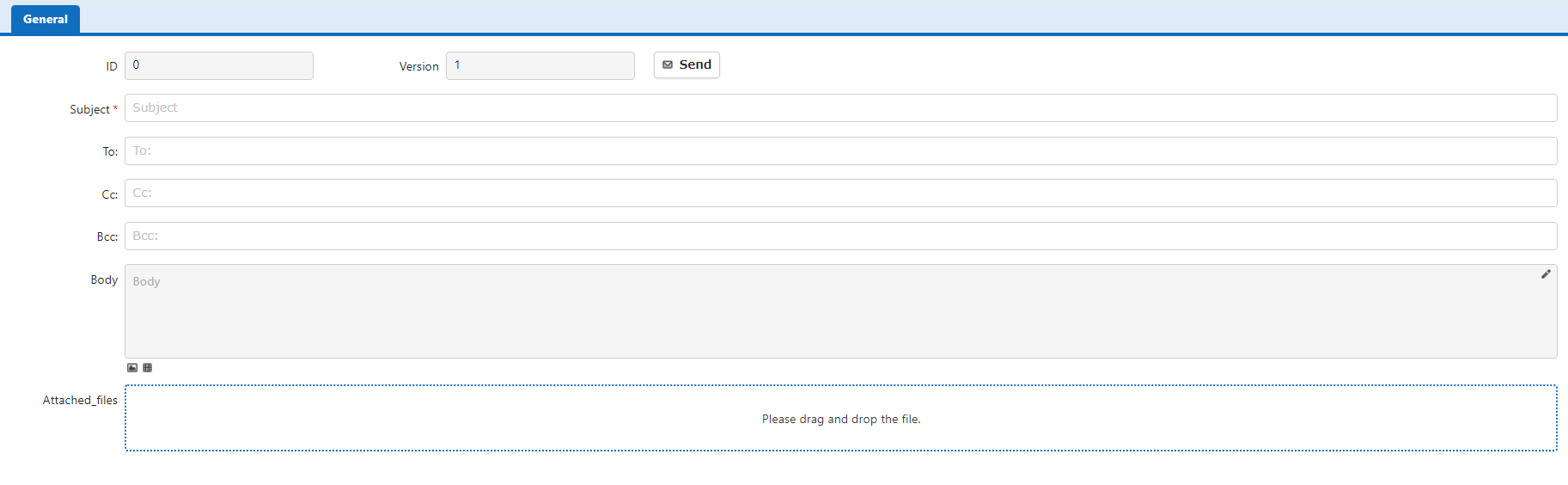
Editing screen with a send button placed by extended HTML

Operation Procedure

  1. Create a table.
  2. Create a new "Script" and enter the contents of the following script. Check "Edit" for the output destination and click the Add button.
  3. From the "Editor", enable AttachmentsA according to the sample code below.
  4. Open the "Extended HTML" tab in the advanced settings of AttachmentsA, enter the following HTML, and click the Update button.
  5. Click the [+New] button to create a new record.
  6. Register any file in Attachments and click the Create button.
  7. Click the Send button and verify that the email is sent.

Code Samples

HTML
1
2
3
4
5
<button id="SendOutgoingMail" type="button" class="clearfix add-btn ui-button ui-corner-all ui-widget">
    <span class="ui-button-icon ui-icon ui-icon-mail-closed"></span>
    <span class="ui-button-icon"></span>
    Send
</button>
JavaScript
$p.ex.sendMailWithAttachments = function () {
    const toString = 'To:';
    const ccString = 'Cc:';
    const bccString = 'Bcc:';
    const titleString = 'Subject';
    const bodyString = 'Body';
    const mailFormaterElementName = 'Email format';
    const errorFormChanged = 'Press the update button to save the latest record contents before sending';
    const errorGetMail = 'Failed to get email data';
    const errorSendMail = 'Failed to send email';
    const errorSelectedMailFormat = 'Failed to get selected email format data/nProgress status has not changed, please contact sales support';

    let postAttachmentsHash = [];

    if ($p.formChanged == 'undefined' || $p.formChanged) {
        alert(errorFormChanged);
        return;
    }

    if (window.confirm('Send email with the following content')) {

        // Get data for each column 
        let to = $p.getControl(toString).val();
        let cc = $p.getControl(ccString).val();
        let bcc = $p.getControl(bccString).val();
        let title = $p.getControl(titleString).val();
        let body = $p.getControl(bodyString).val();
        let attachments = [];
        let id = $p.id();
        let apiSendMailUrl = $p.apiSendMailUrl(id);
        let isOkResponseData = function(data) {
            let isOk = true;
            if(data == null || data == undefined 
                || data.Response == null || data.Response == undefined 
                || data.Response.Data[0] == null || data.Response.Data[0] == undefined) {
                isOk = false;
            }
            return isOk;
        }
        let isEmpty = function(str) {
            let isEmpty = false;
            if(str == null || str == undefined || str.trim().length <= 0) {
                isEmpty = true;
            }
            return isEmpty;
        }
        $p.apiGet({
            'id': id,
            'done': function (data) {
                if (!isOkResponseData(data)) {
                    alert(errorGetMail);
                    return;
                }
                // Define the column to store the attachments to be attached to the email
                let AttachmentsA = data.Response.Data[0].AttachmentsHash.AttachmentsA;
                let attachmentList = AttachmentsA;

                let createAttachments = async function () {
                    return new Promise((attachmentsResolve, attachmentsReject) => {
                        if (attachmentList.length == 0) {
                            attachmentsResolve();
                        }
                        try {
                            (async () => {
                                for (let i = 0; i < attachmentList.length; i++) {
                                    await new Promise((getResolve, reject) => {
                                        postAttachmentsHash[i] = {
                                            'Guid': attachmentList[i].Guid,
                                            'Deleted': 1,
                                        };
                                        // The path of the url variable below will vary depending on your environment, so please change it as appropriate.
                                        let url = '/binaries/' + attachmentList[i].Guid + '/download';
                                        let xhr = new XMLHttpRequest();
                                        xhr.open('GET', url, true);
                                        xhr.setRequestHeader('Content-Type','application/json');
                                        xhr.responseType = 'arraybuffer';
                                        xhr.onload = function (oEvent) {
                                            if (xhr.readyState == 4 && xhr.status == 200) {
                                                let bytes = new Uint8Array(xhr.response);
                                                let binaryString = '';
                                                for (let i = 0; i < bytes.byteLength; i++) {
                                                    binaryString += String.fromCharCode(bytes[i]);
                                                }
                                                let base64 = window.btoa(binaryString);
                                                let obj = {};
                                                obj.Name = attachmentList[i].Name;
                                                obj.Base64 = base64;
                                                obj.ContentType = xhr.getResponseHeader('content-type');
                                                attachments[i] = obj;
                                                getResolve();
                                                if (i == attachmentList.length - 1) {
                                                    attachmentsResolve();
                                                }
                                            }
                                        }
                                        xhr.send();
                                    });
                                }
                            })();
                        } catch (error) {
                            attachmentsReject(error);
                        }
                    })
                };

                createAttachments().then(function (value) {
                    let postData = {
                        To: to,
                        Cc: cc,
                        Bcc: bcc,
                        Title: isEmpty(title) ? ' ' : title,
                        Body: isEmpty(body) ? ' ' : body,
                        Attachments: attachments
                    };
                    console.log(postData);

                    $.ajax({
                        url: apiSendMailUrl,
                        type: 'post',
                        async: false,
                        cache: false,
                        data: JSON.stringify(postData),
                        contentType: 'application/json',
                        dataType: 'json'
                    })
                        .done(function (json, textStatus, jqXHR) {
                        })
                        .fail(function (jqXHR, textStatus, errorThrown) {
                            alert(errorSendMail);
                        })
                        .always(function () {
                        })
                })
            },
            'fail': function (data) {
                alert(errorGetMail);
            },
            'always': function (data) {
            },
            'async': false
        });
    }
}

// Execute processing when the send email button is pressed
$(document).on('click', "#SendOutgoingMail", function () {
    $p.ex.sendMailWithAttachments();
})