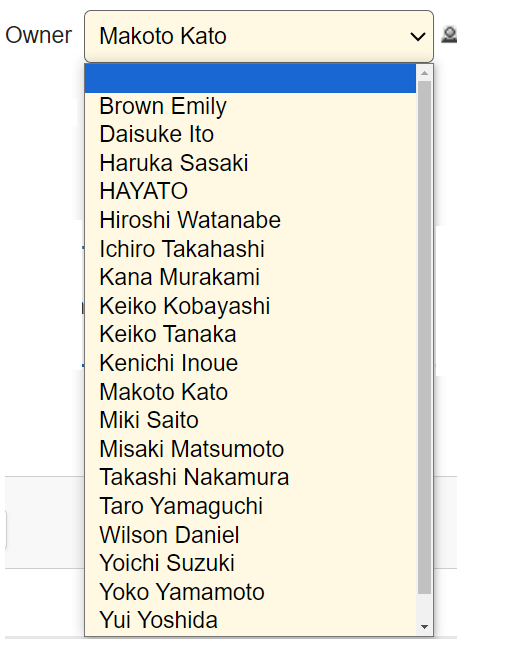
I want to display only specific users in the selection list
Answer
Use the "Filter" function of the options list in combination with "ColumnFilterSearchTypes" of "View".
Overview
To display users whose names start with a specified string or users whose names contain a specified string in the options, use the "Filter" function of the options list.
User (no filtering)
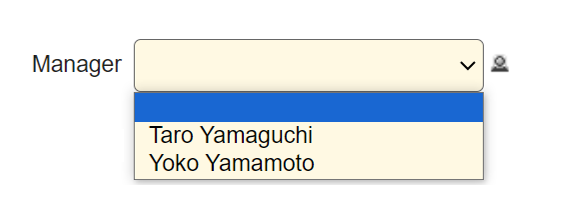
Example 1. Users whose names start with "Yama"
Use the "Filter" function of the option list to narrow down the options. In this case, if you specify "ForwardMatch" for "ColumnFilterSearchTypes" of "View", users whose names specified in ColumnFilterHash start with "Yama" will be displayed.
JSON
[
    {
        "TableName": "Users",
        "View": {
            "ColumnFilterHash": {
                "Name": "Yama"
            },
            "ColumnFilterSearchTypes":{
                "Name":  "ForwardMatch"
            }
        }
    }
]
Display Results
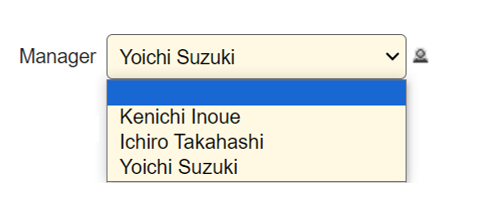
Example 2. Users whose names contain "Ichi"
As in Example 1, use the "Filter" function in the list of options to narrow down the options. In this example, "PartialMatch" is specified for "ColumnFilterSearchTypes" in "View", so users whose names specified in ColumnFilterHash contain "Ichi" are displayed.
JSON
[
    {
        "TableName": "Users",
        "View": {
            "ColumnFilterHash": {
                "Name": "Ichi"
            },
            "ColumnFilterSearchTypes":{
                "Name":  "PartialMatch"
            }
        }
    }
]
Display Results