I want to hide the bar chart shown for the progress rate on the index screen
Answer
You can use a "Script" to hide the bar chart shown for the "Progress Rate" on the "Index screen".
Overview
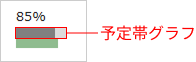
There is no feature to show or hide only part of it (for example, only the planned bar). You need to rewrite the display with a "Script".
Code Samples
Adding the following sample code as a script on a "Table with deadlines" hides the planned bar shown for the "Progress Rate". Set "Output to" to "Index".
Script (Output to: Index)
// Script that hides the planned bar chart
$p.events.on_grid_load = function () {

    // Get the SVG elements that have the svg-progress-rate class
    const svgs = document.querySelectorAll('td svg.svg-progress-rate');

    // Run the operation on each SVG element
    svgs.forEach(function(svg) {

      // Hide the dark grey <rect> element
      svg.querySelector('rect:nth-of-type(1)').style.display = 'none';

      // Hide the light grey <rect> element
      svg.querySelector('rect:nth-of-type(2)').style.display = 'none';

      // Set the y attribute of the green or red <rect> element to 20
      svg.querySelector('rect:nth-of-type(3)').setAttribute('y', '20');

    });
}
The script above hides the planned bar chart and enlarges the bar chart below it (by setting the y attribute to 20).
Adjust it to suit the display you want.