I want to output the error log of a server script
Answer
Use the try-catch statement and context.Log().
Overview
When an error occurs in a "Server Script", an error message "A problem has occurred in the application" is usually displayed, and the error details are recorded in the system log.
When developing a server script, for example, if you want to check the error details immediately while displaying the screen without displaying an error message, you can catch the error (exception) with a try-catch statement and output logs to the Console as exception processing.
1. Output Logs for Foreseeable Errors (Exceptions)
Use try-catch and a log output method. In this case, "Get error details", described below, is ignored.
Log Output Methods
Use the following log output methods depending on where the log is output.
| Output Destination | Method |
|---|---|
| One or both of the following - The console of the developer tools - The system log | logs.LogException |
| - The console of the developer tools | context.Log |
TryCatch
When you enable TryCatch on the Server Script screen, the code you write is placed in a try block, and a process that outputs the error details with logs.LogException is set in the catch block. As a result, the error details are displayed in the console of the browser's developer tools and recorded in the system log.
2. Output Logs for Unforeseeable Errors
Enable "Get error details" on the "Server script" tab of the "Manage Table" screen.
When an error occurs, you can get information that helps with debugging server scripts from the "Console" of the "developer tools". This function applies to all server scripts that are not disabled.
Sample Code
The following sample code is the same as lines 3 to 5 of the sample code in "Usage Examples".
JavaScript
const myItems = items.Get('aaaa');  // Pass a string to the argument
const myItem = myItems[0];    // Specify an array element even though myItems is null → Error
context.Log(myItem.Title);
If you set "After create" as the condition and create a new record, the error details are output to the Console.
If you specify "When loading site settings", "When view processing", "When loading record", or the like as the condition of a server script, a redirect to the error page (/errors/serverscripterror) occurs. In such cases, the error details are not output to the console.
When "Get error details" is enabled, exceptions caught with a try-catch statement are not output.
Usage Examples
JavaScript
try {
    context.Log('Start processing');
    const myItems = items.Get('aaaa');  // Pass a string to the argument
    const myItem = myItems[0];    // Specify an array element even though myItems is null → Error
    context.Log(myItem.Title);
    context.Log('Processing completed');
} catch(e) {
    context.Log('Error occurred');
    // Error log output
    context.Log(e.stack);
}
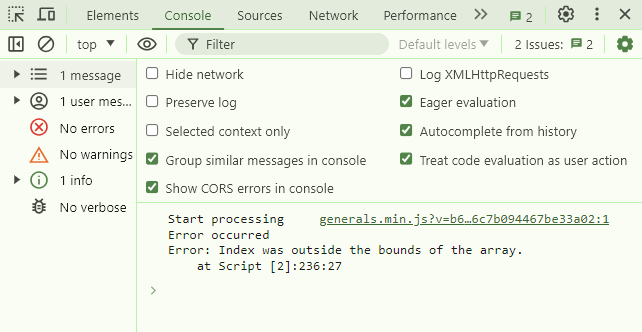
The log is output to the Console of the browser's developer tools as shown below. The developer tools are the screen that appears when you press the F12 key in major browsers such as Chrome.
w)
Supported Versions
| Supported versions | Body |
|---|---|
| 1.5.1.0 and later | Updated to reflect the implementation of "Get error details" |