I want to know the criteria for choosing the storage method for attached files
Answer
The storage method for attached files can be set with the parameter Provider of the configuration file BinaryStorage.json. Select Rds or Local as the value of Provider.
Consider it with reference to the comparison table below and the explanation on this page.
| Item | Rds (database storage) | Local (local storage) |
|---|---|---|
| Recommended scale | Less than 10 GB | Tens of GB or more |
| Consistency | High (transaction guaranteed) | Medium (covered by operations) |
| Backup | Simple (the database only) | Complex (the database + the files) |
| Clustering | Easy | Shared storage required |
| Performance | Degrades as files increase | Reduces the load on the database |
Overview
The storage method for attached files can be set with the parameter Provider of the configuration file BinaryStorage.json. Select Rds or Local as the value of Provider.
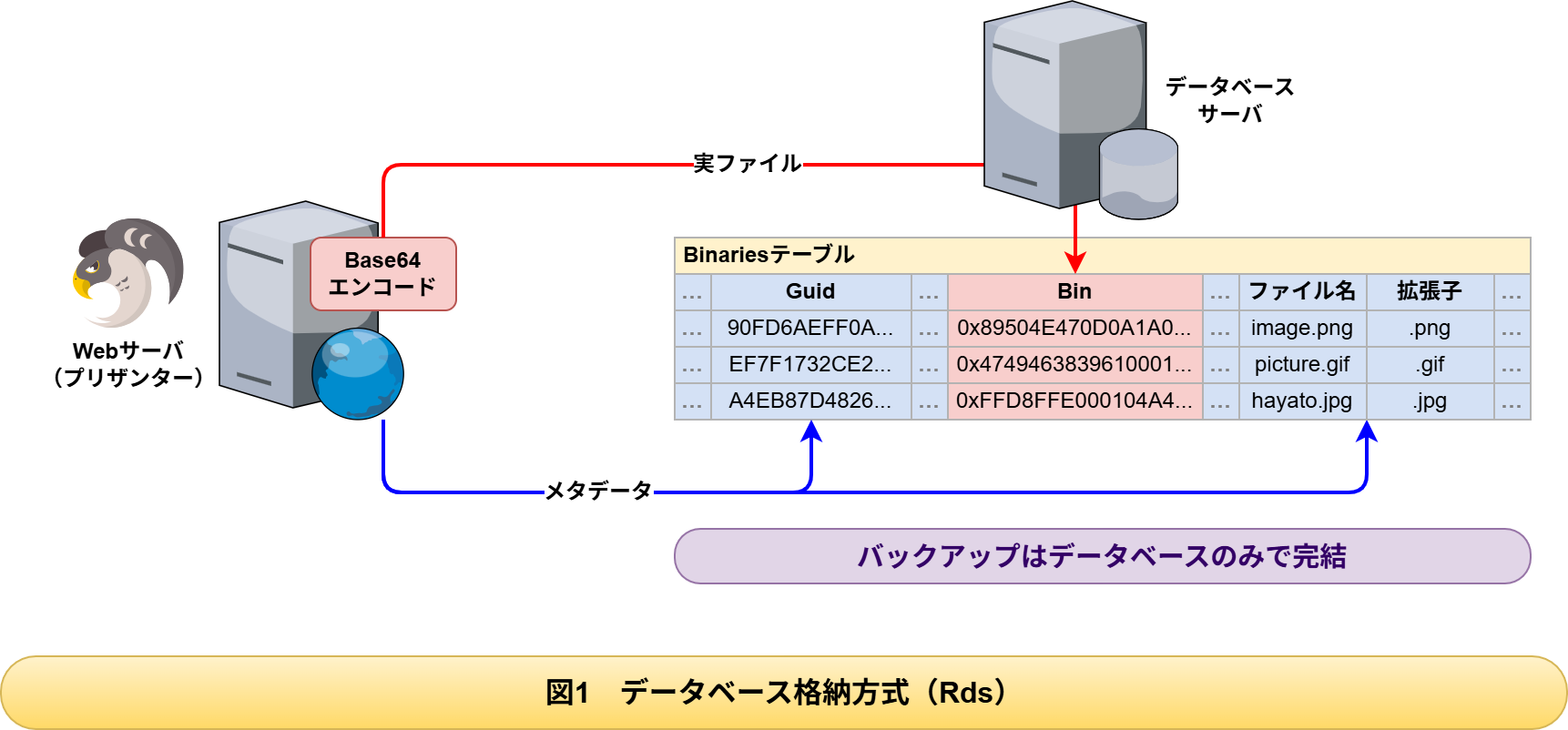
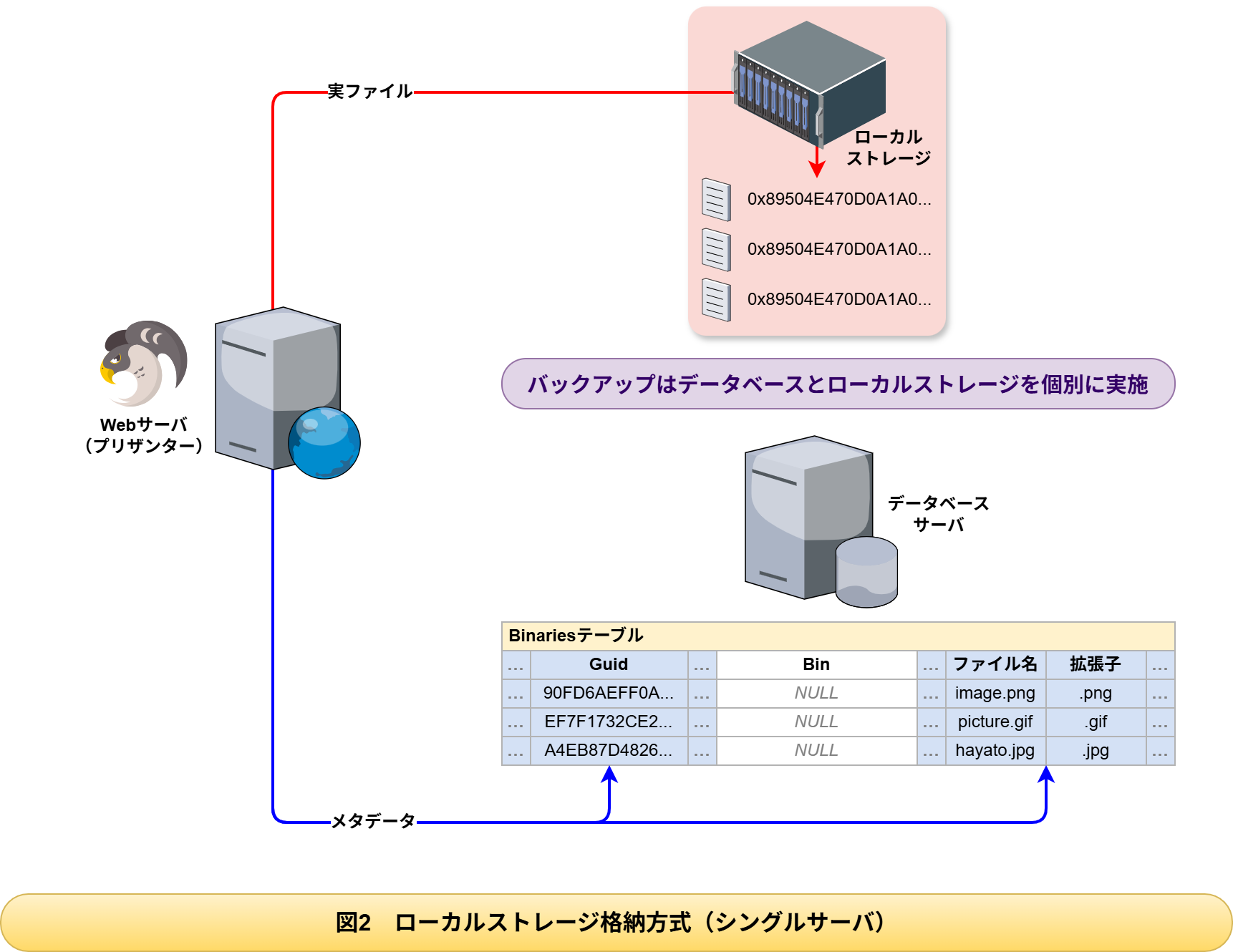
- Rds (database storage)
Stores attached files in the Bin column of the Binaries table of the database (the initial value). - Local (local storage)
Stores attached files in the file system and stores only the management information in the Binaries table of the database.
When there are few attached files there is no problem in leaving it as Rds (database storage), but when there are many attached files, consider changing it to Local (local storage).
Characteristics of Rds (Database Storage)
(1) Advantages
- The files and the metadata are managed consistently within a transaction
- Because the backup is complete with the database alone, operations are simple
- Access control is possible with database permissions alone
(2) Disadvantages
- Large files make the Binaries table swell
- Backup and restore take longer
- Operations on large numbers of files put pressure on database resources
- Each database has its own capacity limits (described later)
(3) Recommended Cases
- The total size of the attached files is less than a few GB
- The size of a single file is mostly 10 MB or less
- You want to give the highest priority to the consistency of the data
- You want to keep the backup operations simple
Characteristics of Local Storage (Local)
(1) Advantages
- The Binaries table holds only a few KB of metadata, so the database stays light
- The constraint on the file size depends on the OS and the file system
- File I/O and database I/O can be separated onto different disks
- It is easy to extend to shared storage
(2) Disadvantages
- You need to back up the database and the file storage separately
- Shared storage is required in a configuration with several web servers
(3) Recommended Cases
- The total size of the attached files is tens of GB or more
- You handle single files of several hundred MB or more
- You want to shorten the backup time
- You want to give priority to the performance of the database
- Shared storage is available in a configuration with several web servers
Capacity Constraints by Database
Storing binary data has the following capacity constraints in each database.
| Database | Data Type | Theoretical Upper Limit | Recommended Practical Size |
|---|---|---|---|
| SQL Server | IMAGE | 2 GB | A few hundred MB or less |
| PostgreSQL | BYTEA | 1 GB | A few hundred MB or less |
| MySQL | LONGBLOB | 4 GB | A few hundred MB or less * |
*When you handle large files in a MySQL environment, you need to adjust the max_allowed_packet setting.
Configuration example in my.cnf or my.ini
The above are the constraints of the data types. In practice, the page size, the buffer settings and the network settings of each database also have an effect. If you frequently handle files of several hundred MB or more, we recommend Local (local storage) from the point of view of database performance.
Best Practices for Operations
We recommend doing the following for each storage method.
For Rds (database storage)
- Monitor the size of the Binaries table regularly
- Run VACUUM regularly (PostgreSQL) or rebuild the indexes (SQL Server)
- Monitor the time the backup takes continuously
For Local (local storage)
- Back up the file storage directory at the same frequency and at the same time as the database backup
- Clean up orphan files regularly
- Monitor the capacity and IOPS of the shared storage
- Check the consistency between the file system and the database regularly
Settings in a Cluster Configuration
For the settings in a cluster configuration, check the following manuals.
BinaryStorage.json
Additional: Ready for Clustering: Configuring Background Services for Multiple Instance Setup
Additional: Ready for Clustering: Settings for Uploading and Registering Attached Files
Additional: Ready for Clustering: Settings for Storing Attached Files in Local Storage
Quartz.json