Access to '...\pleasanter\App_Data\Temp\1E70...3C6.xlsm' is denied
Answer
Grant permissions to the "App_Data\Temp" folder in the Pleasanter installation folder.
Overview
During installation, if you get the error
'C:inetpubwwwrootpleasanterApp_DataTemp1E70....22ED93C6.xlsm' is denied.
Access to 'C:inetpubwwwrootpleasanterApp_DataTemp1E70....22ED93C6.xlsm' is denied.
You may be able to resolve the issue by following the steps below.
- From the Start menu, start "Internet Information Services (IIS) Manager."
-
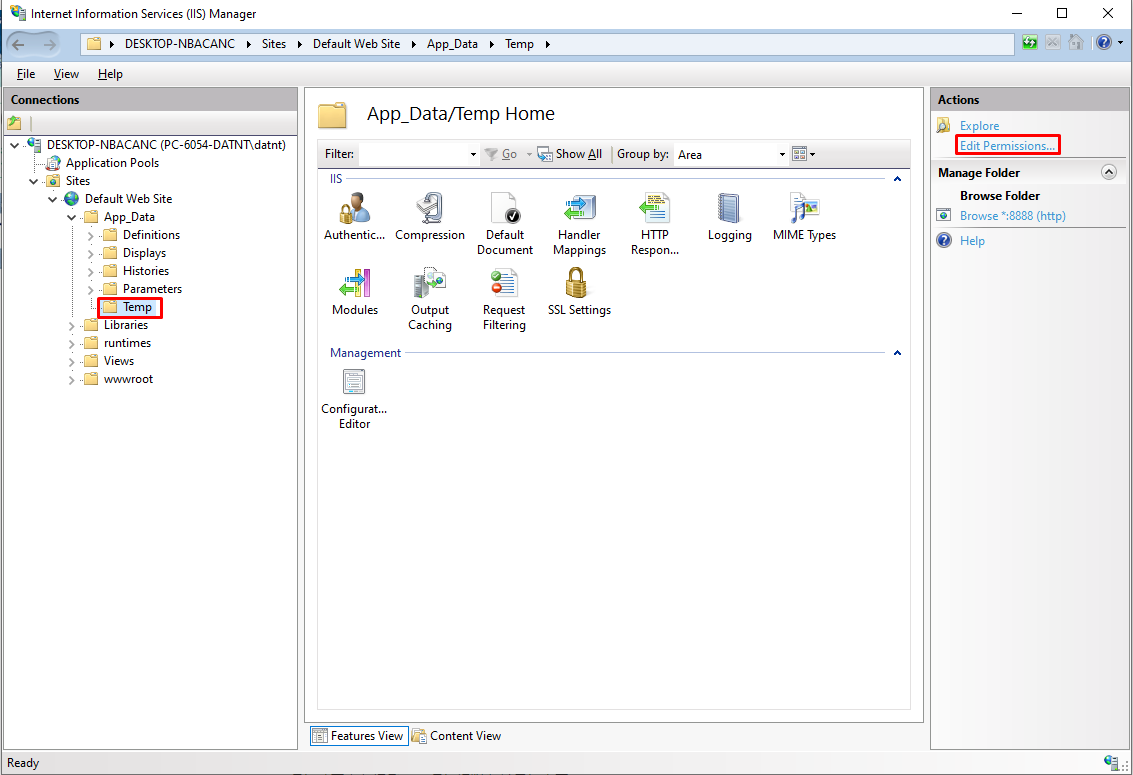
Click "Site" - "Default Web Site" - "pleasanter" - "App_Data" - "Temp" and click "Edit Permissions" in the right pane of the window.
-
Open the Security tab in the Pleasanter properties dialog, select IIS_IUSERS, click the Edit button, check "Modify" and grant permissions.
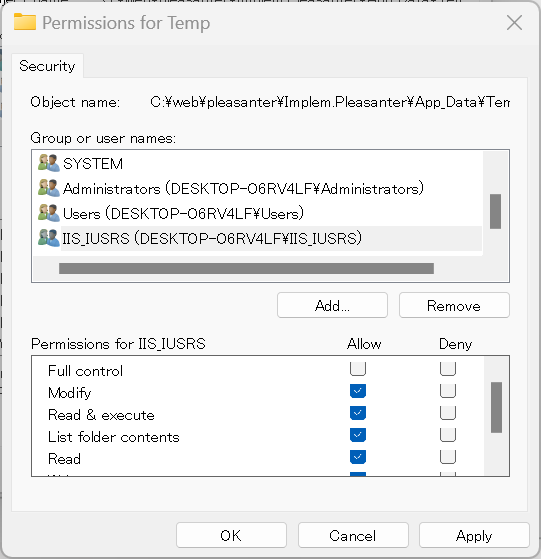
*If you check "Modify", "Write" will also be checked. -
Apply the changes and access Pleasanter again.