Search for Site Name and Get the Site ID Closest to the Site
Overview
You can use the API to obtain the site ID closest to the site in question using "Site Name Search".
Prerequisites
- This function searches for the "Site name" of the site. Please set the site name in advance. Please note that this is not the site "Title".
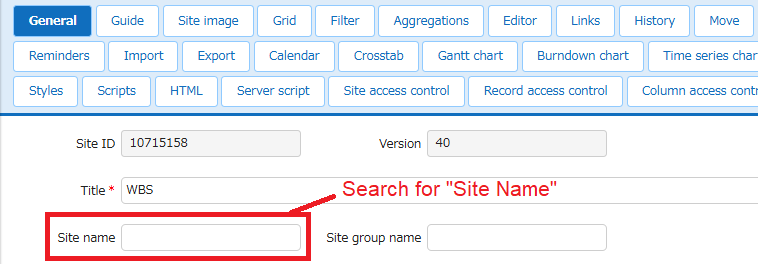
Preparations
Create an API key before performing API operations. Also, this function can only be performed by the tenant manager, so please set the tenant manager from user management.
Request
JSON data is sent in the following request format.
| Setting column | Value |
|---|---|
| HTTP method | POST |
| Content-Type | application/json |
| Character code | UTF-8 |
| URL | http://{server name}/api/items/{site ID}/getclosestsiteid(*1) |
| Body | Please refer to the json data below |
(*1)Edit the {Server name} and {Site ID} parts as appropriate to suit your environment.
For Pleasanter.net, the format is as follows.
https://pleasanter.net/fs/api/items/{site ID}/getclosestsiteid
For {site ID}, specify the site to start the site search from.
JSON
{
    "ApiVersion": 1.1,
    "ApiKey": "345yuAjA6789dA09d8uj6...",
    "FindSiteNames":["ParentSite","HideSite"]
}
About FindSiteNames
- Specify the site names you want to search for as an array.
The following example searches for site names "ParentSite", "HideSite".
JSON
{
    "ApiVersion": 1.1,
    "ApiKey": "345yuAjA6789dA09d8uj6...",
    "FindSiteNames":["ParentSite","HideSite"]
}
Response
The json data in the following format will be returned.
JSON
{
    "SiteId": 12345,
    "Data": [
        {
            "SiteName": "ParentSite",
            "SiteId": 12344
        },
        {
            "SiteName": "HideSite",
            "SiteId": -1
        }
    ]
}
The search returns the SiteId that matches the site name.
If not found or you do not have access rights, it returns -1.
For how to use it in a script, please refer to the following manual.
Developer's Guide: Script: $p.apiGetClosestSiteid
Supported Versions
| Supported versions | Body |
|---|---|
| 1.4.5.0 and later | New function |