Move Site
Overview
Use the API to change the parent site (folder hierarchy) of a site.
Until now, sites could be moved only by drag and drop on the site menu. With this API, you can change the site hierarchy from an external program. The child sites of the site to be moved move together with it. You do not need to run the API for each child site.
Cautions
- Moving a site does not change its permission inheritance source (
InheritPermission). To change the permission inheritance to match the destination, change it separately with Update Site or on the site settings screen.
Limitations
- You can specify only a folder (a site whose reference type is "Sites") as the destination. Specifying a table (Issues, Results, Wiki, and so on) as the destination results in an error.
- You cannot specify the site to be moved itself or any of its descendant sites as the destination. Doing so results in an error.
- You can specify only a site in the same tenant as the user who runs the API as the destination.
ParentIdof Update Site cannot be used to move a site. Use this API to move a site.
Prerequisites
- Create an API Key.
- The
Enabledparameter of Api.json must be set to true. -
The user must have the "Manage site" permission for the site to be moved, the parent site of the site to be moved (the source), and the destination site. If the site to be moved is directly under the top, the permission for the source parent site is not required.
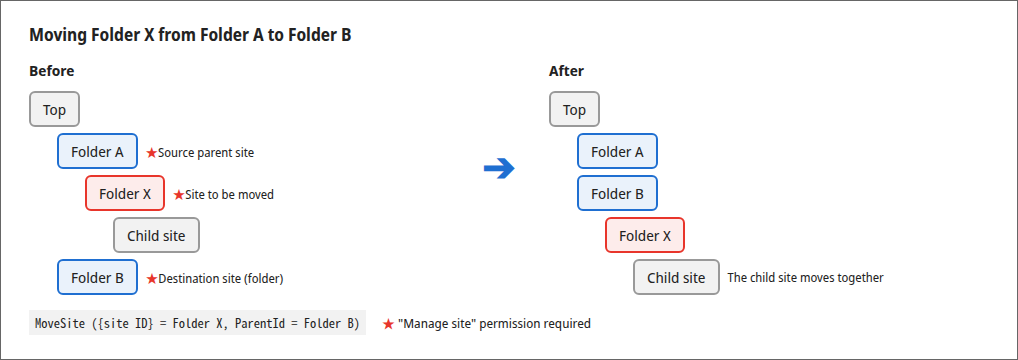
-
If
DisableTopSiteCreationof User.json is true, to specify the top (0 forParentId) as the destination, the user must have "Allow creation at the top of the site" enabled in "User administration". - If
DisableMovingFromTopSiteof User.json is true, to move a site directly under the top, the user must have "Allow moving from the top of the site" enabled in "User administration".
Request
Send JSON data in the following request format:
| Setting item | Value |
|---|---|
| HTTP Method | POST |
| Content-Type | application/json |
| Character Code | UTF-8 |
| URL | http://{server name}/api/items/{site ID}/MoveSite1 |
| Body | Refer to the JSON data below |
Items to Specify in Body
Specifying 0 for ParentId moves the site to the top.
API Parameters
| Item name | Type | Required | Notes |
|---|---|---|---|
| ApiVersion | Number | Yes | API version |
| ApiKey | String | Yes | API key. Can be omitted when accessing from a browser session that is logged in |
| ParentId | Number | Yes | Site ID of the destination parent site. Specifying 0 moves the site to the top |
Execution Example Samples
To move a site under the folder with site ID "12300", specify the following.
Cautions
Modify {{ ... }} and the API key in the code as necessary.
PowerShell Sample
$body = @{
    ApiVersion = 1.1
    ApiKey     = "345yuAjA6789dA09d8uj6..."
    ParentId   = 12300
} | ConvertTo-Json
Invoke-RestMethod -Uri "https://{{server name}}/api/items/12345/MoveSite" -Method Post -ContentType "application/json; charset=utf-8" -Body $body
Python Sample
import requests

res = requests.post("https://{{server name}}/api/items/12345/MoveSite", json={
    "ApiVersion": 1.1,
    "ApiKey": "345yuAjA6789dA09d8uj6...",
    "ParentId": 12300,
})
print(res.status_code, res.json())
curl Sample
curl -X POST "https://{{server name}}/api/items/12345/MoveSite" \
  -H "Content-Type: application/json" \
  -d '{"ApiVersion":1.1,"ApiKey":"345yuAjA6789dA09d8uj6...","ParentId":12300}'
Response
If successful, JSON data in the following format is returned.
| Item name | Type | Notes |
|---|---|---|
| Id | Number | Site ID of the moved site |
| StatusCode | Number | HTTP status code |
| LimitPerDate | Number | Maximum number of API calls per day. Not output if no limit is set |
| LimitRemaining | Number | Remaining number of API calls for the day. Not output if no limit is set |
| Message | String | Message of the processing result |
In case of an error, the following is returned.
| StatusCode | Message | Situation |
|---|---|---|
| 400 | Invalid request. | ParentId is not specified. |
| 401 | Unable to authorize.2 | The API key is not specified or is invalid. |
| 403 | You do not have permission to perform this operation. | The user does not have the "Manage site" permission for the site to be moved, the source parent site, or the destination site. Moving to the top or moving from the top is not allowed. |
| 404 | The specified information was not found. | The site to be moved or the destination site does not exist. The destination is a site in another tenant. |
| 500 | This operation cannot be performed. | The destination is not a folder. The site to be moved itself or one of its descendant sites is specified as the destination. |
Confirmation Items in Case of Error
・Precautions when using the API and things to check if an error occurs
・FAQ: What to check if modified configuration files or API requests (JSON format) are not recognized correctly
Supported Versions
| Supported versions | Body |
|---|---|
| 1.5.9.0 and later | Added function |
Related Information
- Create an API Key
- Update Site
- $p.apiMoveSite
- Api.json
- User.json
- User Management Function: Creation and Update
-
Please edit the {server name} and {site ID} parts to suit your environment as appropriate. For {site ID}, specify the site ID of the site to be moved. For Pleasanter.net, the format is
https://pleasanter.net/fs/api/items/{site ID}/MoveSite. ↩ -
Because the user cannot be authenticated, the message is returned in the language set in
DefaultLanguageof Service.json. WhenDefaultLanguageisja, the message is returned in Japanese. ↩