Developer Function: Extensions: Extended SQL: Executing Extended SQL from the API
Overview
You can combine API and Extended SQL to retrieve and update data directly from the database.
Notes
- If used incorrectly, it may cause Pleasanter to become unavailable or data to be corrupted, so please test thoroughly before use.
- Login confirmation is performed using API keys and sessions, but authority checks for tables are not performed, so it must be performed in SQL.
- Unlike the Record Retrieval API, there is no limit to the number of records that can be retrieved. Therefore, depending on the retrieved content and conditions, the processing time may be very long, so please test thoroughly before use.
Limitations
- After updating the Extended SQL JSON file or SQL file, the changes will not be reflected until you "restart the application".
- For security reasons, Extended SQL cannot be set from the web screen.
Preparations
Please create an API Key before operating the API.
The following two columns are required in the .json file.
| Parameter name | e.g. | Description |
|---|---|---|
| Name | Example) Sample | Set the name when executing from API. |
| Api | Example) true | If true, execution from API is allowed. |
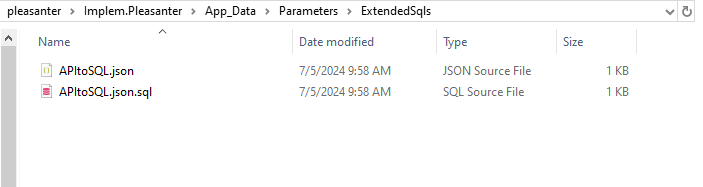
You can write the SQL statement directly in CommandText, but if the SQL statement is long, you can separate the files.
In that case, name the file .sql with the same name as the .json file, as in the image below.
Example)
APItoSQL.json ←Definition file
APItoSQL.json.sql ←SQL statement
URL
Use the following URL. The HTTP method is POST.
http://{ServerName}/api/extended/sql
Edit the "http://{ServerName}" part to suit your environment.
Request
As shown in the example below, the parameters entered in Params can be used as parameters to be passed to extended SQL, such as @RefID.
You can also use standard parameters such as @_U.
JSON file
APItoSQL.json
SQL statement (external file)
APItoSQL.json.sql
SELECT [ReferenceId]
      ,[DeptId]
      ,[GroupId]
      ,[UserId]
      ,[Ver]
      ,[PermissionType]
  FROM [Implem.Pleasanter].[dbo].[Permissions]
  WHERE [ReferenceId]=@RefID
Response
The table contains an array of records, and the records contain column names and values in a hash of Key and Value.
{
    "StatusCode": 200,
    "Response": {
        "Data": {
            "Table": [
                {
                    "ReferenceId": 1,
                    "DeptId": 0,
                    "GroupId": 0,
                    "UserId": 1,
                    "Ver": 1,
                    "PermissionType": 511
                },
                {
                    "ReferenceId": 1,
                    "DeptId": 0,
                    "GroupId": 0,
                    "UserId": 9,
                    "Ver": 1,
                    "PermissionType": 31
                },
                {
                    "ReferenceId": 1,
                    "DeptId": 0,
                    "GroupId": 0,
                    "UserId": 10,
                    "Ver": 1,
                    "PermissionType": 31
                },
                {
                    "ReferenceId": 1,
                    "DeptId": 0,
                    "GroupId": 1,
                    "UserId": 0,
                    "Ver": 1,
                    "PermissionType": 511
                }
            ]
        }
    }
}
When values are retrieved from multiple tables, the following response will be displayed.
Response.Data.Table (first table)
Response.Data.Table1 (second table)
Response.Data.Table2 (third table)
Execute by specifying a user
If the owner of the object to be operated is Implem.Pleasanter_Owner, the following error will occur.
Example) When inserting into the Items table in PostgreSQL with User privileges
"PostgresException: 42501: permission denied for sequence Items_ReferenceId_seq"
This is because the owner of the sequence object is Implem.Pleasanter_Owner, but the executor is Implem.Pleasanter_User.
When executing extended SQL from the API, you can execute it with Owner privileges by specifying the following.
JSON file
APItoSQL.json