Extended SQL
Overview
To enable data updates that cannot be achieved with standard functions, SQL is extended when creating, updating, deleting, etc. records.
Executing Extended SQL
You can register extended SQL by adding the information required for registration in Pleasanter to the SQL and placing it in a dedicated folder as a JSON parameter file.
There are two main ways to execute registered extended SQL.
- Execute it by linking it to an event that occurs in Pleasanter
- Execute it at any time by calling it from a server script or the API
This page explains the former method. For details on the latter method, see the following pages.
Server Script
- Developer's Guide: Server Script: extendedSql
- Developer's Guide: Server Script: view
- Developer's Guide: Server Script: view.OnSelectingWhere
API
Cautions
- If used incorrectly, Pleasanter may become unusable or data may be corrupted, so please test it thoroughly before use.
- Login verification is performed using API keys and sessions, but permission checks for tables are not performed, so these must be performed within SQL.
Limitations
- After updating the extended SQL JSON file or SQL file, the changes will not be reflected until you restart the application.
- For security reasons, extended SQL cannot be configured from the web interface.
How To Set Up Extended SQL
.¥Pleasanter¥App_Data¥Parameters¥ExtendedSqls¥ Create a json file containing the following content and restart Pleasanter. The file extension must be json. It is possible to organize the hierarchy of ExtendedSqls files into folders. In this case, all json files under the folders will be loaded as configuration files.
| Parameter name | Example value | Description |
|---|---|---|
| Name | Sample | Set the name when executed from the API. |
| Description | "This SQL executes..." | Description of the SQL. It does not affect operation. |
| Disabled | false | Disabled and does not work if true. |
| DeptIdList | [1,2,3] | Specify the target dept ID in array format. If not specified, it can be omitted. |
| GroupIdList | [1,2,3] | Specify the target group ID in array format. If not specified, it can be omitted. |
| UserIdList | [1,2,3] | Specify the target user ID in array format. If not specified, it can be omitted. |
| SiteIdList | [1,2,3] | Specify the target site ID in array format. If not specified, it can be omitted. |
| IdList | [1,2,3] | Specify the IDs of the target records in array format. If not specified, it can be omitted. |
| ColumnList | ["ClassA"] | Specify the "Database Column Name" to be targeted when using OnSelectingColumn. |
| Api | false | If true, it is possible to "Execute Extended SQL from API". It can also be used from the "extendedSql object" in "Server Script". |
| DbUser | "Owner" | Specify the DB user when executing extended SQL from API. If not specified, it will be executed with "User". It is only valid when executed from API. |
| Html | false | If true, the value obtained as a hidden type will be stored in the Html input tag. |
| OnCreating | false | If true, it will be executed before creating a record. |
| OnCreated | false | If true, it will be executed after creating a record. |
| OnUpdating | false | If true, it will be executed before updating a record. |
| OnUpdated | true | If true, execute after updating a record. |
| OnDeleting | false | If true, execute before deleting a record. |
| OnDeleted | false | If true, execute after deleting a record. |
| OnBulkDeleting | false | If true, execute before bulk deleting records. |
| OnBulkDeleted | false | If true, execute after bulk deleting records. |
| OnImporting | false | If true, execute before importing records. |
| OnImported | false | If true, execute after importing records. |
| OnSelectingColumn | false | If true, add SQL to dynamically obtain the contents of the column displayed on the list screen and edit screen. |
| OnSelectingWhere | false | If true, add a Where clause to limit the records displayed on the list screen and edit screen. |
| OnSelectingWhereParams | ["ExtendedFieldName"] | When a value is entered in the specified extended field, the value is added as a parameter to OnSelectingWhere. *The value is the "Name" of the extended field. |
| OnSelectingWherePermissionsDepts | false | If true, a Where clause is added to limit the records of the Depts table to be displayed in the access control options list. |
| OnSelectingWherePermissionsGroups | false | If true, a Where clause is added to limit the records of the Groups table to be displayed in the access control options list. |
| OnSelectingWherePermissionsUsers | false | If true, a Where clause is added to limit the records of the Users table to be displayed in the access control options list. |
| OnSelectingOrderBy | false | If true, an OrderBy clause is added to sort the records displayed in the list screen. |
| OnSelectingOrderByParams | ["ExtendedFieldName"] | When a value is entered in the specified extended field, a value is added as a parameter to OnSelectingOrderBy. *The value is specified as the "Name" of the extended field. |
| OnUseSecondaryAuthentication | false | If true, it will be executed before 2-step authentication. |
| CommandText | "update [Issues] set ....." | Write the SQL to be executed. |
Variables Available for CommandText (SQL Server)
The following statements in CommandText can be used as variables.
| Variable | Example value | Description |
|---|---|---|
| @_T | 1 | Replaced with the tenant ID. |
| @_D | 10 | Replaced with the dept ID of the department to which the executing user belongs. |
| @_U | 30 | Replaced with the user ID of the executing user. |
Variables available for CommandText (PostgreSQL)
The following statements in CommandText can be used as variables.
| Variable | Example value | Description |
|---|---|---|
| @ipT | 1 | Replaced with the tenant ID. |
| @ipD | 10 | Replaced with the dept ID of the department to which the executing user belongs. |
| @ipU | 30 | Replaced with the user ID of the executing user. |
Variables Available for CommandText (OnUseSecondaryAuthentication only. Common for SQL Server and PostgreSQL)
The following statements in CommandText can be used as variables.
| Variable | Example value | Description |
|---|---|---|
| @TenantId | 1 | Replaced with the tenant ID. |
| @UserId | 30 | Replaced with the user ID of the executing user. |
Available placeholders for CommandText
The following statements in CommandText will be replaced as placeholders.
However, it cannot be used in CommandText with "OnUseSecondaryAuthentication": true.
| Placeholder | Example value | Description |
|---|---|---|
| {{SiteId}} | 2 | Replaced with the site ID. |
| {{Id}} | 10 | Replaced with the record ID. |
| {{Timestamp}} | 20171106 09:00:00.000 | Replaced with the timestamp entered from the form before the record was updated. Only available for OnUpdating. Can be used to check for record update conflicts. |
Loading CommandText from An External File
If you create a text file with the extension .sql added to the json file in the same directory as the json file, you can read CommandText from an external file. The file name of the external file for sample.json is sample.json.sql.
Code Samples
Example 1: OnUpdated
In the example below, the SQL in CommandText will be executed when a record is updated on site ID:2 with "OnUpdated": true.
JSON
{
    "Description": "Sample",
    "SiteIdList": [2],
    "OnUpdated": true,
    "CommandText": "-- Write an arbitrary SQL statement."
}
Example 2: OnSelectingWherePermissionsUsers
For example, you might not want certain users to appear in the access control selection list.
Users.Body is where the description field of the user details screen is stored. If you enter NOLIST here, the user will be excluded from the list.
JSON
{
    (Omission)
    "OnSelectingWherePermissionsUsers": true,
    "CommandText": "(\"Users\".\"Body\" is null or \"Users\".\"Body\"<>'NOLIST')"
}
Current Option List

Enter NOLIST in the description field for a specific record
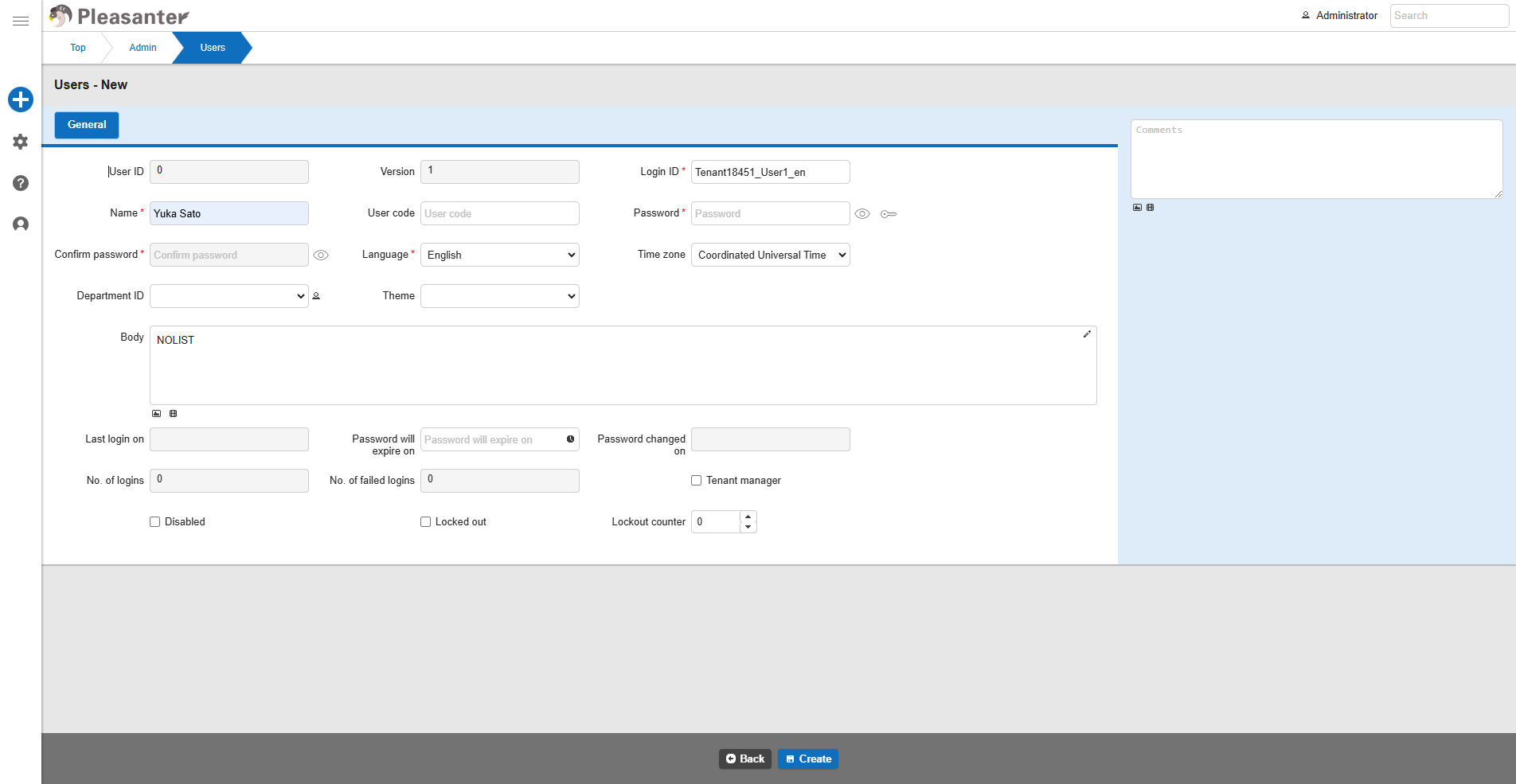
Excluded from the selection list

Example 3: OnUseSecondaryAuthentication
If you want to exclude a user from two-factor authentication, set a SQL statement that returns one or more items and the value "0".
In the example below, if the logged-in user is a member of group ID:1, he/she will not be subject to two-factor authentication.
JSON
{
    (Omission)
    "OnUseSecondaryAuthentication": true,
    "CommandText": "select 0 from [GroupMembers] where [GroupMembers].[GroupId] = 1 and [GroupMembers].[UserId] = @UserId;"
}
Executing a Stored Procedure
When executing a stored procedure from extended SQL, grant EXECUTE permission to "Implem.Pleasanter_User".
Linked Server
In the case of SQL Server, you can use the linked server function to connect to an external database and perform I/O.