$p.apiMoveSite
Overview
Changes the parent site (folder hierarchy) of a site from a script.
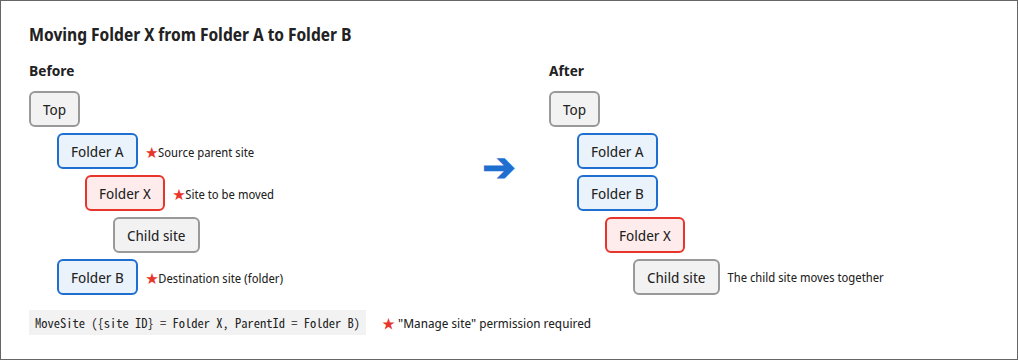
This is a wrapper function for calling the Move Site API from a script. You can run it from a script set on the "Script" tab of table management, or from the console of the browser's developer tools. The child sites of the site to be moved move together with it. You do not need to run this function for each child site.
Cautions
- Moving a site does not change its permission inheritance source (
InheritPermission). To change the permission inheritance to match the destination, change it separately with $p.apiUpdateSite or on the site settings screen.
Limitations
- You can specify only a folder (a site whose reference type is "Sites") as the destination. If you specify a table (Issues, Results, Wiki, and so on) as the destination,
failis called. - You cannot specify the site to be moved itself or any of its descendant sites as the destination. If you do,
failis called. - You can specify only a site in the same tenant as the user who runs the script as the destination.
ParentIdof $p.apiUpdateSite cannot be used to move a site. Use this function to move a site.
Prerequisites
- The
Enabledparameter of Api.json must be set to true. -
The user must have the "Manage site" permission for the site to be moved, the parent site of the site to be moved (the source), and the destination site. If the site to be moved is directly under the top, the permission for the source parent site is not required. The script runs with the permissions of the logged-in user.
-
If
DisableTopSiteCreationof User.json is true, to specify the top (0 forParentId) as the destination, the user must have "Allow creation at the top of the site" enabled in "User administration". - If
DisableMovingFromTopSiteof User.json is true, to move a site directly under the top, the user must have "Allow moving from the top of the site" enabled in "User administration".
Syntax
$p.apiMoveSite({
    id: (Site ID of the site to be moved),
    data: { ParentId: (Site ID of the destination parent site) },
    done: (Optional processing),
    fail: (Optional processing),
    always: (Optional processing)
});
Parameters
| Parameter name | Type | Required | Overview |
|---|---|---|---|
| id | long | Yes | Site ID of the site to be moved |
| data | object | Yes | Destination. Specify the site ID of the destination parent site in ParentId. Specifying 0 moves the site to the top |
| done | function | Yes | Processing when API communication succeeds |
| fail | function | - | Processing when API communication fails |
| always | function | - | Processing on completion |
You do not need to specify an API key. The function runs in the session of the logged-in browser.
Return Value
done and fail receive the same response as the Move Site API.
| Parameter name | Type | Overview |
|---|---|---|
| Id | long | Site ID of the moved site |
| StatusCode | int | HTTP status code |
| Message | string | Message of the processing result |
If the site is moved, done receives the following.
The main values passed to fail on errors are as follows.
| StatusCode | Message | Condition |
|---|---|---|
| 400 | Invalid request. | ParentId is not specified. |
| 403 | You do not have permission to perform this operation. | The user does not have the "Manage site" permission for the site to be moved, the source parent site, or the destination site. Moving to the top or moving from the top is not allowed. |
| 404 | The specified information was not found. | The site to be moved or the destination site does not exist. The destination is a site in another tenant. |
| 500 | This operation cannot be performed. | The destination is not a folder. The site to be moved itself or one of its descendant sites is specified as the destination. |
Usage Examples
Moving a Site Under a Folder
Moves the site with site ID "12345" under the folder with site ID "12300".
$p.apiMoveSite({
    id: 12345,
    data: { ParentId: 12300 },
    done: function (data) {
        console.log(data);
        console.log('The site was moved successfully.');
    },
    fail: function (data) {
        console.log('Failed to move the site.');
    },
    always: function () {
        console.log('Moving the site has finished.');
    }
});
Moving a Site to the Top
Specifying 0 for ParentId moves the site to the top.
Supported Versions
| Supported versions | Body |
|---|---|
| 1.5.9.0 and later | Added function |