$p.getValue
Overview
This method is used to retrieve the value of a field by its name on the edit screen. It should be used when utilizing the values of the target fields.
Limitations
- The value of "Comment" cannot be retrieved.
Syntax
JavaScript
Retrieved Content
For "Class Column", "Numeric Value Column", "Date Column", "Description Column", "Check Column", and "Attachment Column", the following results are returned
Class Column
- The content retrieved depends on the selected options. "ID", "Version", "Title", "Status", "Administrator", "Responsible Person" behave similarly.
| Option Setting | Retrieved Content | Remarks |
|---|---|---|
| Unset | Entered string | Corresponds to "ID", "Version", and "Title". A free-text field. |
| String | Option string | |
| Code and String | Option code | "Status" corresponds here. Use "$p.getControl" to retrieve the option string. |
| Link to another table | Option code (Record ID) | "Administrator", "Responsible Person" correspond here. Use "$p.getControl" to retrieve the option string. |
Numeric Value Column
- The input value is retrieved as a "string". Please cast the type as needed when using it in scripts.
- Decimal values are retrieved with zero-padding based on the significant digits (only for read-only spinner controls).
- If a format is specified, the value before format conversion is retrieved.
- If units are set, the retrieved value will not include the units.
- This applies to fields such as "Workload", "Progress", and "Remaining Workload".
Date Column
- The input value is retrieved as a "string". Please cast the type as needed when using it in scripts.
- The same applies to "Start" and "Completion" fields.
Description Column
- The input value is retrieved as a "string".
- Pasted images are retrieved as URL strings.
- The same applies to "Body" column.
Check Column
- The value is retrieved as a Boolean (true/false) based on the input checkbox (ON/OFF).
Attachment Column
- The value is retrieved as a "string" in the following array format:
[{"Guid":"1234...","Name":"testPDFfile.pdf","Size":12345},{"Guid":"ABCD...","Name":"testxlsxfile.xlsx","Size":45678},{"Guid":"4E5F6G...","Name":"testpptxfile.pptx","Size":901234}]
Usage Examples
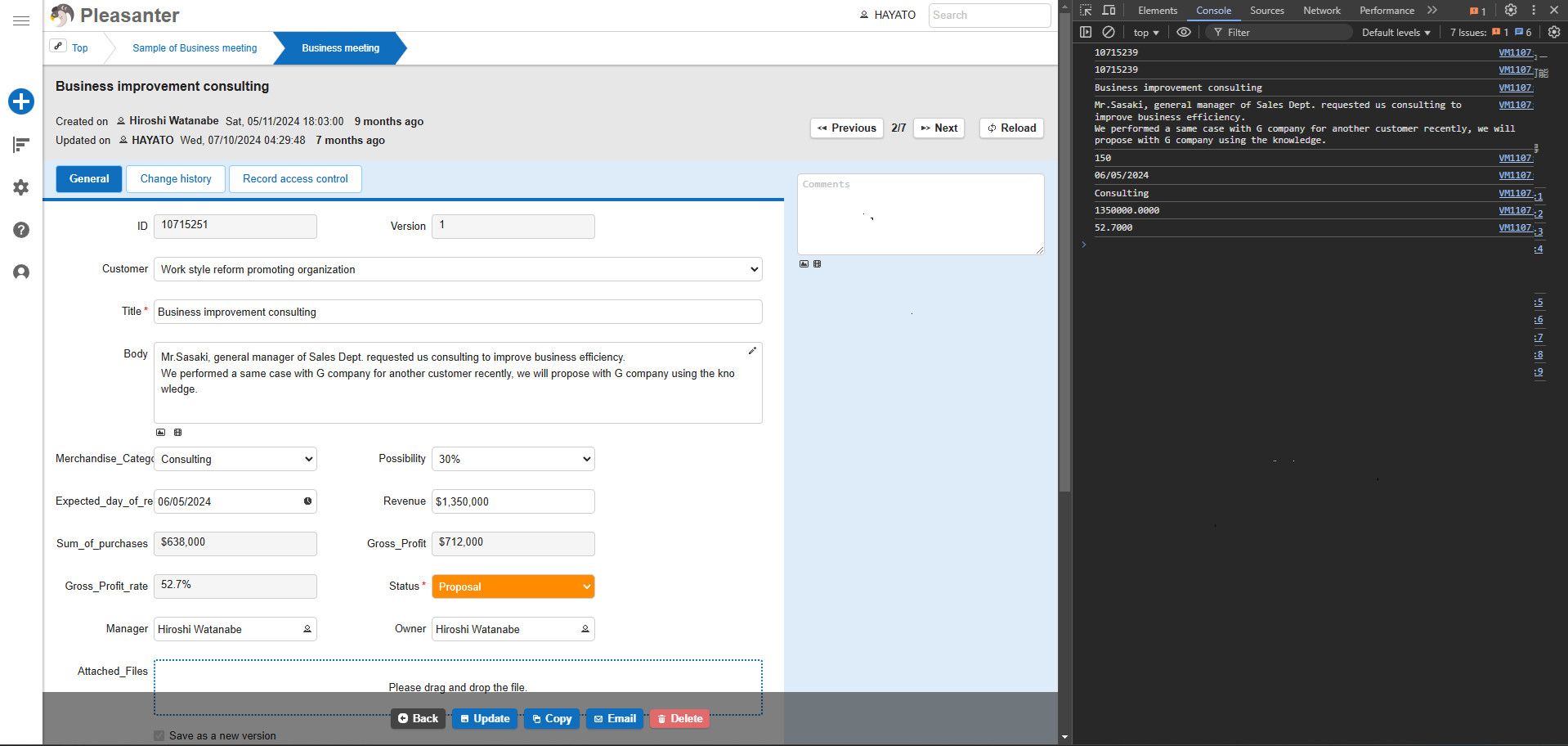
Set the following sample code in the Pleasanter script, set the output destination to "Editor", and then navigate to the editing screen. The values will be output to the Developer Tools Console.
JavaScript
$p.events.on_editor_load = function () {
    // Output values to Developer Tools Console
    console.log($p.getValue('Customer'));       // Code (Record ID) of the selected option in 'Customer' (ClassA)
    console.log($p.getValue('ClassA'));     // Can also retrieve by field name 'ClassA'
    console.log($p.getValue('Subject'));       // 『Subject』
    console.log($p.getValue('Body'));       // 『Content』field retrieved by Body field name
    console.log($p.getValue('Status'));       // Code of selected option in『Status』
    console.log($p.getValue('Expected Order Date'));  // 『Expected Order Date』
    console.log($p.getValue('ClassB'));     // 『Product Classification』retrieved by 'ClassB' field name
    console.log($p.getValue('Sales'));       // 『Sales』field, retrieves value before format conversion
    console.log($p.getValue('NumD'));       // 『Gross Profit Rate』retrieved by 'NumD', excludes unit value
}
Output Result
Supported Versions
| Supported Versions | Body |
|---|---|
| 1.4.12.0 and later | Added function |