items.GetClosestSite
Overview
This is the "GetClosestSite method" of the "Items Object". Use "Site Name Search" to get the site information closest to the site in question.
Prerequisites
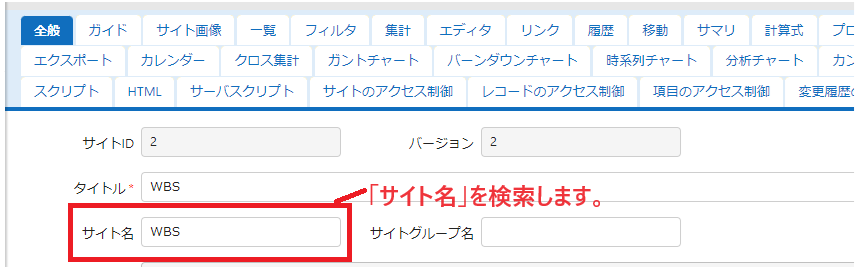
- This function searches for the "Site name" of the site. Set the site name in advance. Note that this is not the "Title" of the site.
Syntax
Parameters
| Parameter | Type | Required | Description |
|---|---|---|---|
| name | string | Yes | Specify the site name |
| id | int | Specify the search start site ID (default: site ID where the server script is stored) |
Return Value
Returns the "apiModel" of the corresponding site.
If not found or you do not have access rights, null is returned.
Usage Examples
The following example retrieves site information for the site name "WBS".
const site = items.GetClosestSite('WBS');
if (site) {
    context.Log(site.SiteId);
    context.Log(site.Title);
    context.Log(site.ReferenceType);
}
Usage Example 1
The following example retrieves site information for the site name "WBS" from the site where the "Server Script" is stored.
Usage Example 2
The following example retrieves site information for the site name "WBS" from the site with site ID 1234.
Use this in "Background Server Script".
Code Samples
1. Cache site IDs to make processing more efficient
Site IDs are cached, and from the second time on they are retrieved from the cache to make processing more efficient.
// Site ID cache
const _siteIdCache = new Map();
// Get the SiteId from the site name (cached)
function getSiteIdOrNull(siteName) {
    if (_siteIdCache.has(siteName)) return _siteIdCache.get(siteName);
    const site = items.GetClosestSite(siteName);
    if (!site || !site.SiteId) {
        logs.LogUserError(
            `${siteName} Failed to get the site information`,
            getSiteIdOrNull.name,
        );
        return null;
    }
    _siteIdCache.set(siteName, site.SiteId);
    return site.SiteId;
}
const siteId = getSiteIdOrNull('Project management');
if (siteId) {
    logs.LogInfo(`SiteId of Project management: ${siteId}`);
}
Supplement
The difference between this and "Developer's Guide: Server Script: items.GetSiteByName" is that the items.GetSiteByName method returns all sites with the specified site name, but the item.GetClosestSite method returns the site with the specified site name closest to the search start site.