File Import Sample
This is sample code that imports CSV files stored in any folder.
The processing image is as follows.
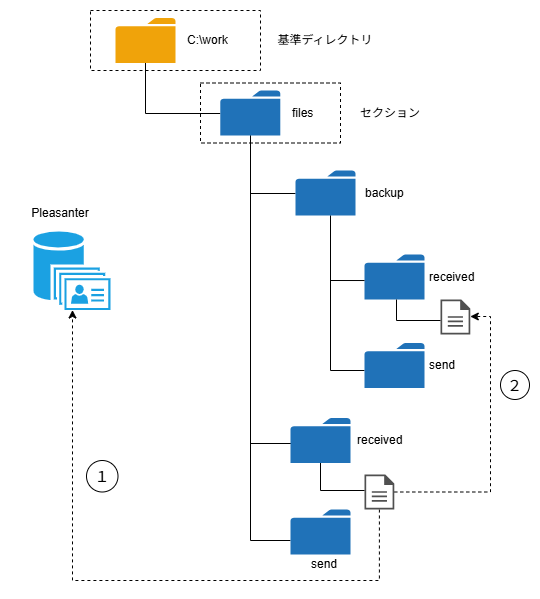
(1) Import the CSV files stored in the "received" folder into Pleasanter
(2) After processing, move them to "backup/received"
JavaScript
const SECTION = 'files';
const RECEIVED = 'received';
const BACKUP_RECEIVED = 'backup/received';
const SITE_NAME = '[Site Name]';
// Get the site information
const site = items.GetClosestSite(SITE_NAME);
if (!site) {
    logs.LogException(`Site: ${SITE_NAME} was not found.`);
    return false;
}
const siteId = site.SiteId;
// Read the files in the received folder and import them
const param = {};
const lists = $ps.file.getFileList(SECTION, RECEIVED);
if (lists.length > 0) {
    for (const element of lists) {
        const result = $ps.file.import(
            SECTION,
            `${RECEIVED}/${element}`,
            siteId,
            $ps.JSON.stringify(param),
        );
        if (!result) {
            logs.LogException(
                `Import failed. File name: ${element}`,
            );
            return false;
        } else {
            logs.LogInfo(
                `Import succeeded. File name: ${element} Result: ${$ps.JSON.stringify(
                    result,
                )}`,
            );
        }
    }
    // After the import completes, move the files to the backup folder
    for (const element of lists) {
        const moveResult = $ps.file.moveFile(
            SECTION,
            `${RECEIVED}/${element}`,
            `${BACKUP_RECEIVED}/${element}`,
        );
        if (!moveResult) {
            logs.LogException(`Failed to move the file. File name: ${element}`);
            return false;
        } else {
            logs.LogInfo(`Moved the file successfully. File name: ${element}`);
        }
    }
}