View Department Differences
Overview
1.5.9.0
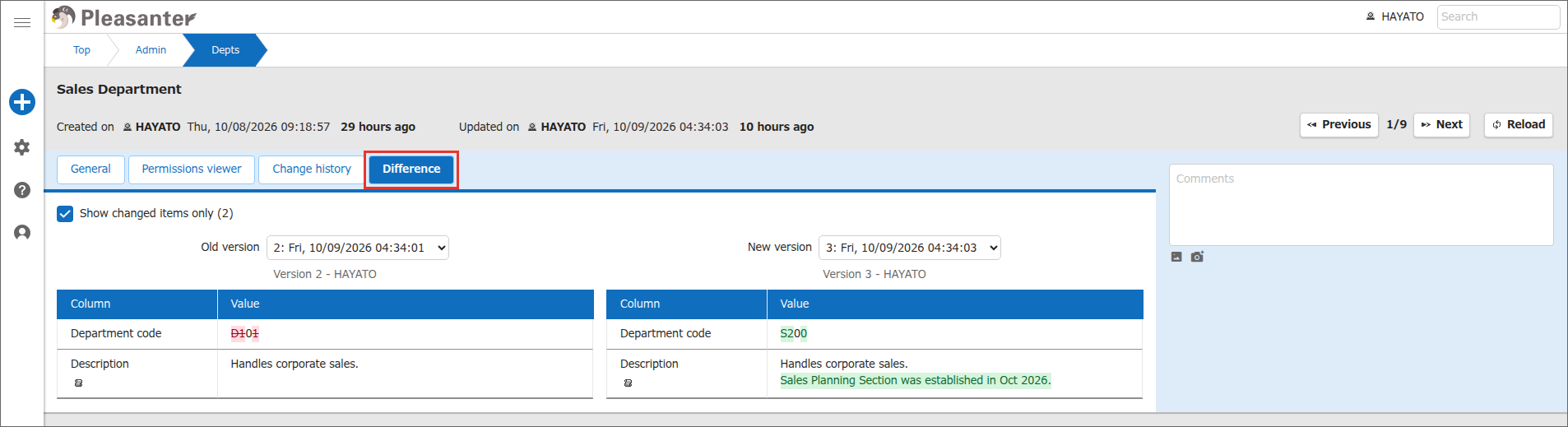
On the "Difference" tab of the "Department administration" screen, you can compare two versions of a department side by side. Changed characters are highlighted in color.
By default, the version currently displayed is compared with the version just before it. The screen and operations are the same as for table records. For details, see "Table Function: View Record Differences".
Limitations
- "Version", "Updated by", and "Updated on" are not compared.
- For a department that has only one version, "There is no previous version to compare." is displayed and you cannot compare versions.
- You cannot edit values on the "Difference" tab. You cannot restore a department from the change history or delete its change history. The "Change history" tab has no "Restore" or "Delete change history" button.
Prerequisites
- The user performing this operation must have "Tenant manager" privileges enabled.
Operation Procedure
- Click "Manage" in the navigation menu.
- Click "Department administration".
- Click the target department in the list.
- Click the "Difference" tab.
-
The version currently displayed and the version just before it are displayed side by side. The left side is the old version and the right side is the new version.
-
To change the versions to compare, select a version in the "Old version" or "New version" selection box.
Supported Versions
| Supported Version | Description |
|---|---|
| 1.5.9.0 and later | Function added |