Column Advanced Settings: Control Type (Numerical Value)
Overview
Set the "Control Type" of the "Numerical Value Column" on the "Editor". You can choose between "Normal" and "Spinner".
Limitations
- Can only be set for "Numerical Value Column".
- If you select "Spinner", the format set in "Format" will not be applied.
- If you select "Spinner", a numerical value with 5 or more digits may be cut off and displayed outside the display area of the "Input Column".
Prerequisites
- "Site Administration Permission" is required to configure settings.
Setting Content
| No | Option | Description |
|---|---|---|
| 1 | Normal | A control that allows you to enter numerical values in a text box. |
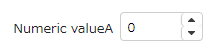
| 2 | Spinner | A control that allows you to change the numerical value using the up and down buttons. |
Operation Image
Normal input field

Spinner input field