Title
Overview
This is an input item that stores the "Title" to identify the record. The "Title" is displayed in the "Editor", "Grid screen", "Calendar", "Gantt Chart", "Burndown Chart", "Kanban", etc. By using "Title Merge", you can automatically set the title from the contents of multiple items.
Limitations
- If no title is entered, "No Title" will be displayed.
- Strings of 1024 characters or more cannot be registered.
Prerequisites
- "Site Administration Permission" is required to configure settings.
Advanced Settings
For advanced settings, refer to "Input Column Advanced Settings".
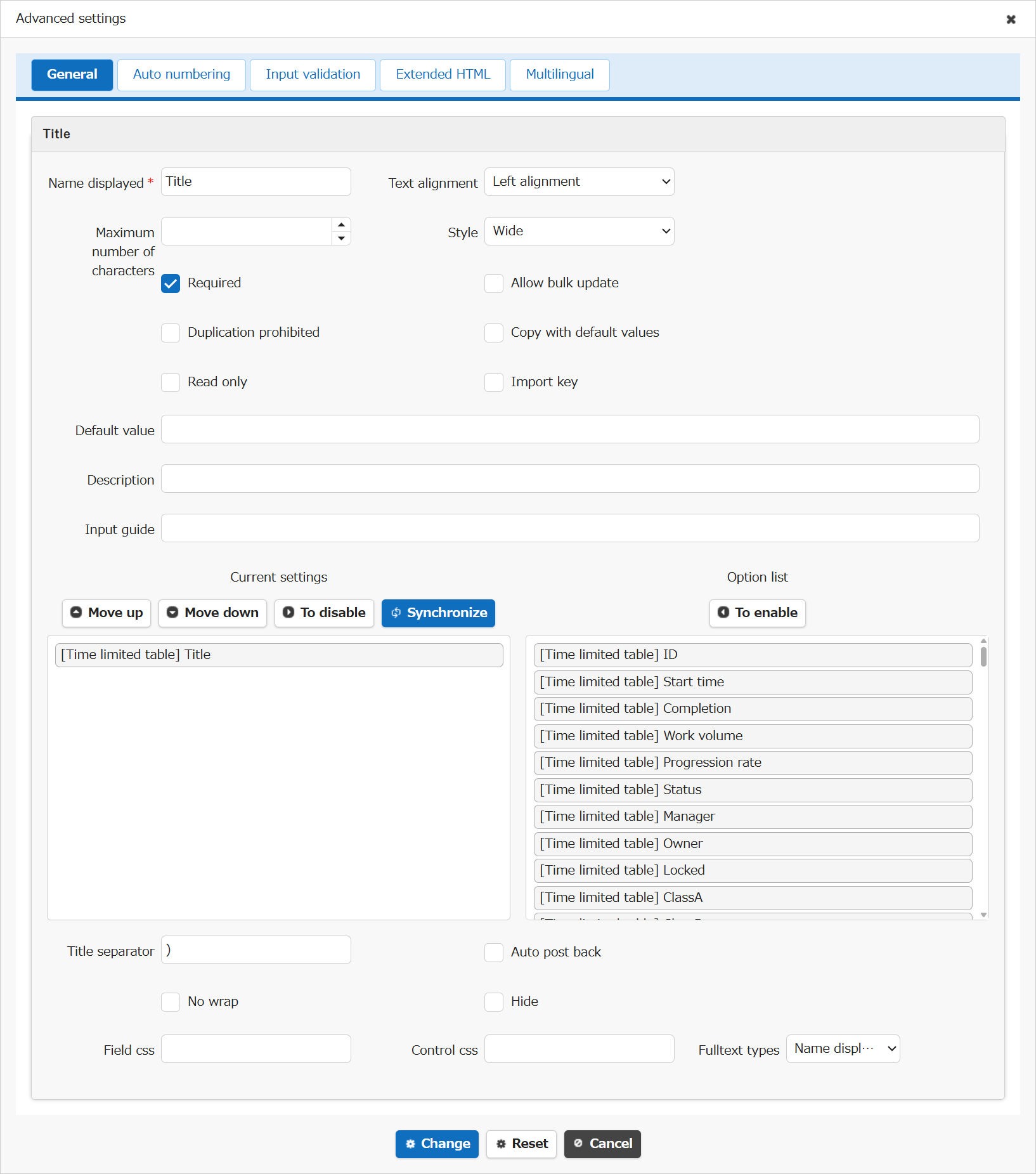
| Setting item name | Default value | Description |
|---|---|---|
| Name displayed | Title | "Name Displayed" is read only. It cannot be made editable. |
| Text alignment | Left alignment | Set the "Text Alignment" |
| Maximum number of characters | (Blank) | Set the "Maximum Number of Characters" |
| Style | Wide | Set the "Style" |
| Required | Checked | Set the "Required" |
| Allow bulk update | Unchecked | Set the "Allow Bulk Update" |
| Duplication prohibited | Unchecked | Set the "Duplication Prohibited" |
| Copy with default values | Unchecked | Set the "Copy with Default Values" |
| Read only | Unchecked | Set the "Read Only" |
| Import key | Unchecked | Set the "Import Key" |
| Default value | (Blank) | Set the "Default Value" |
| Description | (Blank) | Set the string ("Description") to display in the item's "Tooltip". |
| Input guide | (Blank) | Set the "Input Guide" |
| Current settings/Option list | [Table type]Title | Set the "Title Concatenation" |
| Title separator | ) | Set the "Title Concatenation" separator |
| Auto post back | Unchecked | Set the "Auto post back" |
| No wrap | Unchecked | Set the "No Wrap" |
| Hide | Unchecked | Set the "Hide" |
| Field css | (Blank) | Set the "Field CSS" |
| Control css | (Blank) | Set the "Control CSS" |
| Fulltext types | Name displayed | Set the "Fulltext Types" |
Related Information
- Tenant Management Function: Logo, Title, Logo Image
- Manage Table: Editor
- Table Function: Record Screen Index
- Table Function: Calendar Display of Records
- Manage Table: Gantt Chart
- Table Function: Display Burndown Chart Of Records
- Table Function: Kanban Display of Records
- Manage Table: Editor: Column Advanced Settings: Title Combination
- Manage Table: Editor: Column Advanced Settings
- Manage Table: Editor: Column Advanced Settings: Name Displayed
- Manage Table: Editor: Column Advanced Settings: Read-only
- Manage Table: Editor: Column Advanced Settings: Alignment
- Manage Table: Editor: Column Advanced Settings: Maximum Number of Characters
- Manage Table: Style
- Manage Table: Editor: Column Advanced Settings: Input Required
- Manage Table: Editor: Column Advanced Settings: Allow Bulk Update
- Manage Table: Editor: Column Advanced Settings: Duplication Prohibited
- Manage Table: Editor: Column Advanced Settings: Copy with Default Value
- Manage Table: Editor: Column Advanced Settings: Import Key
- Manage Table: Editor: Column Advanced Settings: Description
- Common Function: Tooltip Display When Selecting User Or Group
- Manage Table: Editor: Column Advanced Settings: Auto post back
- Manage Table: Editor: Column Advanced Settings: No Wraparound
- Manage Table: Editor: Column Advanced Settings: Hidden
- Manage Table: Editor: Column Advanced Settings: Field CSS
- Manage Table: Editor: Column Advanced Settings: Control CSS
- Manage Table: Editor: Column Advanced Settings: Fulltext Types