Filter: Days Before and After "Due Soon"
Overview
Set the date range for the "Due Soon" filter, which searches for records whose "Completed" column date on the "Screen Index" is close to the current time.
Limitations
- Only available for "Time-limited Table".
Prerequisites
- "Site Administration Permission" is required to configure settings.
Setting Content
| No | Option | Description |
| 1 | Days Before "Due Soon" | Specify the number of days before the deadline to be considered as due soon. |
| 2 | Days After "Due Soon" | Specify the number of days after the deadline to be considered as due soon. |
Example of Settings and Filter Results
The following example assumes today's date is April 1.
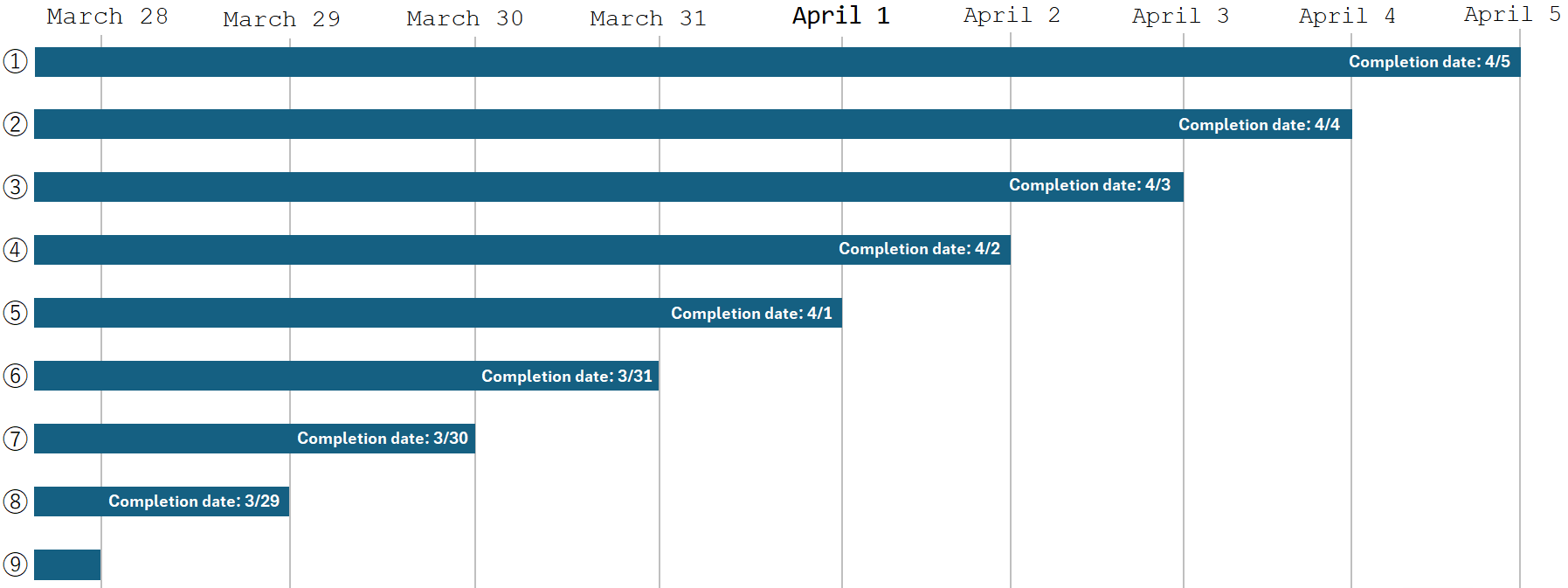
1. Days Before "Due Soon"
*In the following table, the days after the deadline is set to 0 days.
| Days Before "Due Soon" | Filter Target Records | Notes |
| 0 days | ⑥ | Filter by records due the day before today. (Records due 3/31) |
| 1 day | ⑥, ⑦ | Filter by records due the day before today minus 1 day. (Records due on 3/30 or later) |
| 2 days | ⑥, ⑦, ⑧ | Filter by records due the day before today minus 2 days. (Records due on 3/29 or later) |
| Days Before "Due Soon" | Filter Target Records | Notes |
| 0 days | ⑤ | Filters by records due today. (Records due 4/1) |
| 1 day | ⑤, ⑥ | Filters by records due today minus 1 day. (Records due on 3/31 or later) |
| 2 days | ⑤, ⑥, ⑦ | Filters by records due today minus 2 days. (Records due on 3/30 or later) |
2. Days After "Due Soon"
*In the following table, the days before the deadline is set to 0 days.
| Days After "Due Soon" | Filter Target Records | Notes |
| 0 days | ⑥ | Filter by records due the day before today. (Records due on 3/31) |
| 1 day | ⑤, ⑥ | Filter by records due the day before today plus 1 day. (Records due up to 4/1) |
| 2 days | ④, ⑤, ⑥ | Filter by records due the day before today plus 2 days. (Records due up to 4/2) |
| Days After "Due Soon" | Filter Target Records | Notes |
| 0 days | ⑤ | Filter by records due today. (Records due on 4/1) |
| 1st day | ④,⑤ | Filter by records due today plus 1 day. (Records due up to 4/2) |
| 2nd day | ③,④,⑤ | Filter by records due today plus 2 days. (Records due up to 4/3) |