Screen Index: Column Advanced Settings: Name Displayed on Screen Index
Overview
Specify the string to be displayed in the header of the "Column" on the "Screen Index". If it is the same as the "Name Displayed" in the "Editor", there is no need to specify it. Use it only if you want to change the display name from the "Name Displayed" to the "Editor". You can use it to change the name displayed of the header when using "Custom Design" and displaying multiple columns in one cell.
Limitations
- Cannot be left blank. Required Column.
Prerequisites
- "Site Administration Permission" is required to configure settings.
Operation Procedure
- Refer to "Screen Index Column Advanced Settings".
Operation Image
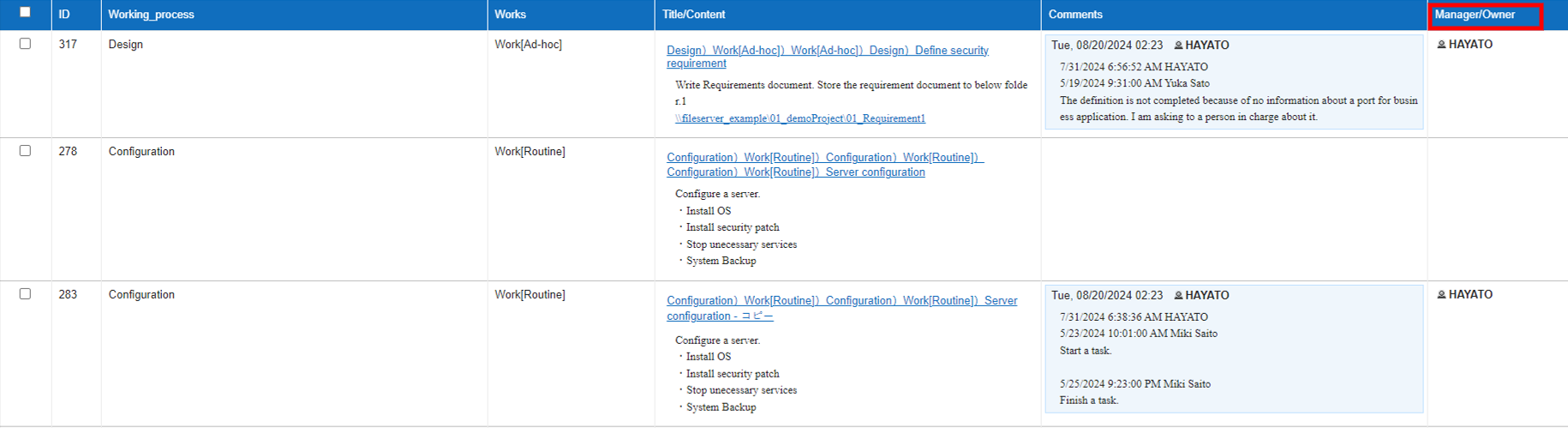
In the example below, the header of the "Manager Column" using "Custom Design" is changed to "Manager/Owner".