Screen Index: Column Advanced Settings: Use Custom Design
Overview
Use this when you want to display multiple columns in a "cell" on the "Screen Index". Use this when you want to display "Manager Column" and "Owner Column" in one "cell" to reduce the width of the "List". "Markdown" can be used.
Limitations
- Columns that use "Custom Design" cannot be edited in "Index Edit".
- "Column" in other "Table" cannot be used for "Custom Design".
Prerequisites
- "Site Administration Permission" is required to configure settings.
Operation Procedure
- Refer to "Screen Index Column Advanced Settings"
Example Setting
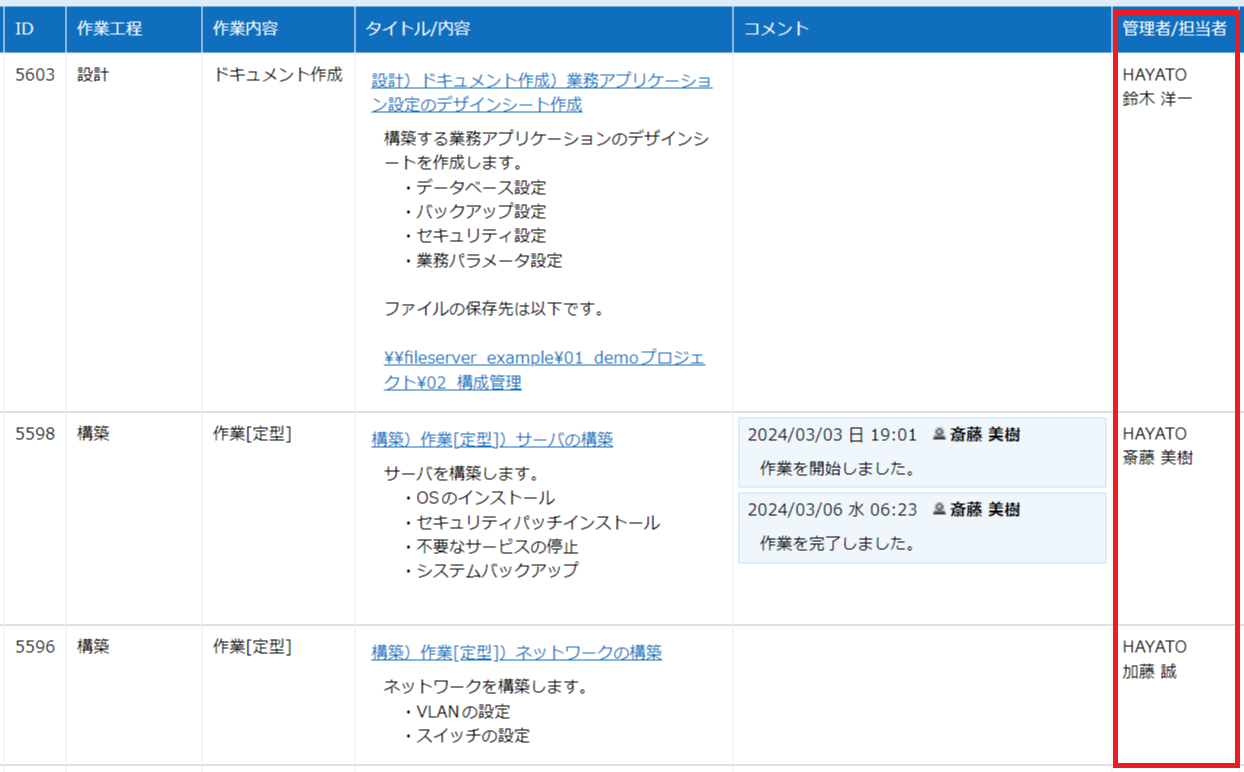
Below is an example of displaying "Manager Column" and "Owner" in one "cell".
Text
Operation Image
In the example below, in addition to "Custom Design", "Name Displayed on Screen Index" is set to "Manager/Owner" to change the header on the "Screen Index".