Auto Numbering
Overview
This feature automatically enters a number, at the time the process runs, into a field that can hold a specified string (Title, Body, Class, or Description). It is enabled by setting the target field on the Auto Numbering tab of the process's detailed settings and specifying the numbering format in the Format field.
Limitations
- You cannot specify the numbering order when executing bulk processing for a process.
Operation Procedure
- Click the Auto Numbering tab.
- Click the "Create New" button.
- Select the target field.
- Configure the necessary fields.
- Click the "Change" button.
- Click the "Update" button in Process Management.
Configuration Items
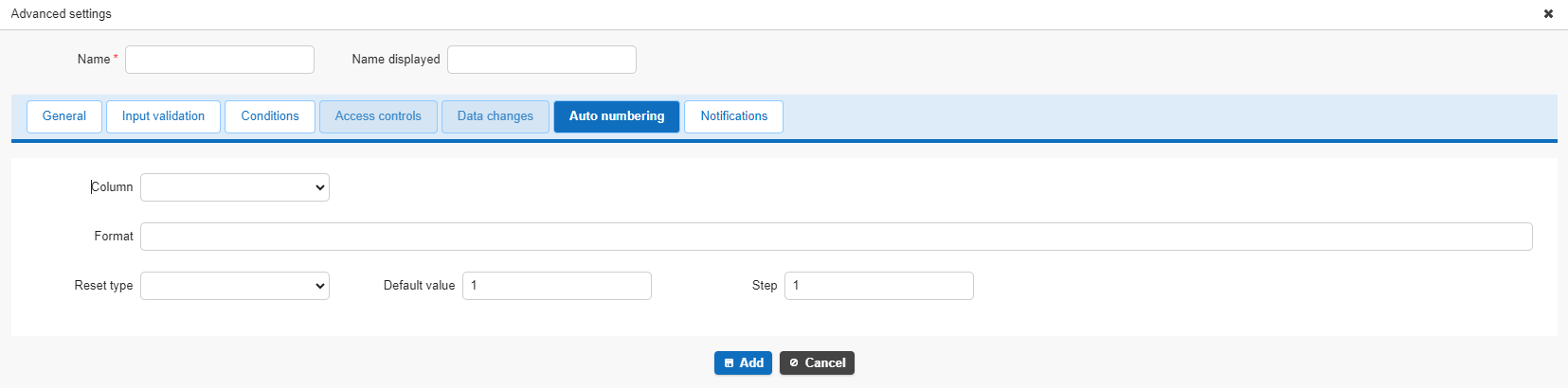
| Field Name | Description | Configuration Example |
|---|---|---|
| Field | Select the field to be auto-numbered | |
| Format | Specify the auto numbering format | [yyyyMMdd]-[Class A]-[NNNN] |
| Reset Type | Specify the type that resets the auto numbering count to zero | Select from Year, Month, Day, or String |
| Default Value | Specify the value at which auto numbering starts | 1 |
| Step | Specify the auto numbering interval | 1 |
The auto numbering configuration method is the same as Auto Numbering under Advanced Field Settings in the Editor, so see the page below for details.
Table Management: Editor: Advanced Field Settings: Auto Numbering
Tips
- You can combine this with the Conditions tab or Access Controls tab of a process to run it at any timing you choose.
- Setting the execution type on the General tab to "Create or Update" lets it run whenever a record is updated using the standard Update button.
- Auto Numbering under Advanced Field Settings in the Editor can run when a record is created, but the process's Auto Numbering tab can also be used when a record is updated.
- If you clear the input on a field configured for auto numbering, auto numbering runs again.
- If you don't want to allow changes to an already-numbered value, make the field read-only.
Supported Versions
| Supported Version | Details |
|---|---|
| 1.4.10.0 and later | Added "Value Function Operation" to change types Added Cc and Bcc to email notification recipients |
| 1.4.11.0 and later | Added "Added Button / Create or Update" to execution types Added an icon setting to the General tab of common settings |