Input Validation
Overview
Configure the input validation content for process execution.
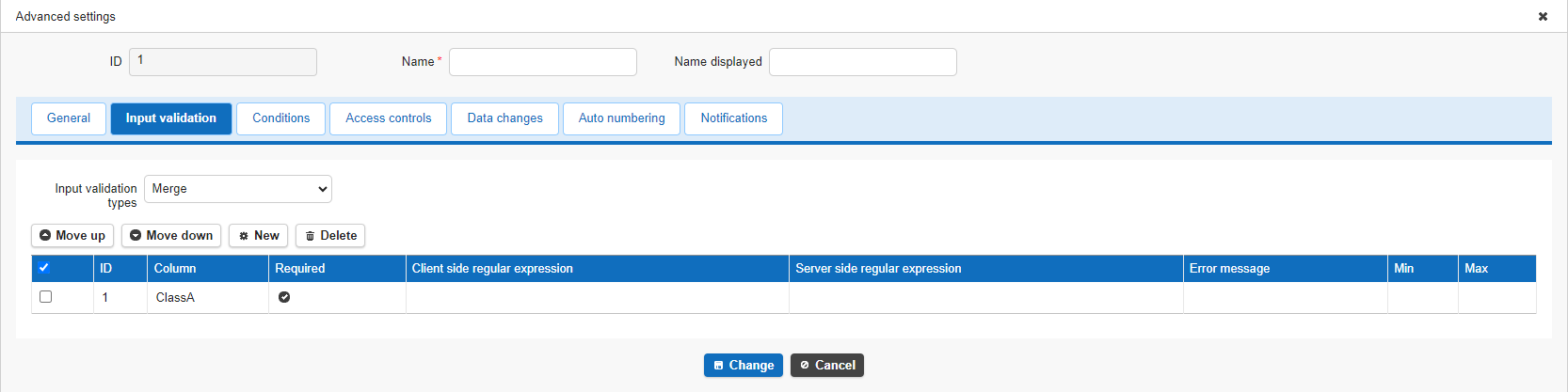
Input Validation Type
Configure the input validation type for the button added by the process feature.
| Choice | Description |
|---|---|
| Merge | Performs both the input validation from the editor's field settings and the process's input validation. |
| Replace | Does not perform the input validation from the editor's field settings; only performs the process's input validation. |
| None | Does not perform input validation. |
The default value is "Merge."
Operation Procedure
Create input validation for each field and validation content.
- Click the Input Validation tab.
- Click the "Create New" button.
- Configure the validation condition.
- Click the "Add" button.
- Click the "Change" button on the Input Validation tab.
- Click the "Update" button in Process Management.

Input Validation Configuration Items
| Field Name | Description |
|---|---|
| Column | Select the column to validate. |
| Required | Set this if input is required. |
| Client side regular expression | Set, as a regular expression, the validation performed when focus moves away from the column after input. |
| Server side regular expression | Set, as a regular expression, the validation performed when the record is created or updated. |
| Error message | Set the message displayed when a validation error occurs in the client side or server side regular expression check. |
| Min | Set the minimum value allowed in the numeric check performed during process execution. |
| Max | Set the maximum value allowed in the numeric check performed during process execution. |
Configuration Items Available for Each Column
| Column | Required | Client side regular expression | Server side regular expression | Error message | Max | Min |
|---|---|---|---|---|---|---|
| Title | ○ | ○ | ○ | ○ | × | × |
| Body | ○ | ○ | ○ | ○ | × | × |
| Start time | ○ | × | × | × | × | × |
| Completion | ○ | × | × | × | × | × |
| Work volume | ○ | × | × | × | ○ | ○ |
| Progression rate | ○ | × | × | × | ○ | ○ |
| Status | ○ | × | × | × | × | × |
| Manager | ○ | × | × | × | × | × |
| Owner | ○ | × | × | × | × | × |
| Locked | ○ | × | × | × | × | × |
| Class column | ○ | ○ | ○ | ○ | × | × |
| Numeric value column | ○ | × | × | × | ○ | ○ |
| Date column | ○ | × | × | × | × | × |
| Description column | ○ | ○ | ○ | ○ | × | × |
| Check column | ○ | × | × | × | × | × |
| Attachments column | ○ | × | × | × | × | × |
Supported Versions
| Supported Version | Details |
|---|---|
| 1.4.10.0 and later | Added "Value Function Operation" to change types Added Cc and Bcc to email notification recipients |
| 1.4.11.0 and later | Added "Added Button / Create or Update" to execution types Added an icon setting to the General tab of common settings |