Performance: By Day
Overview
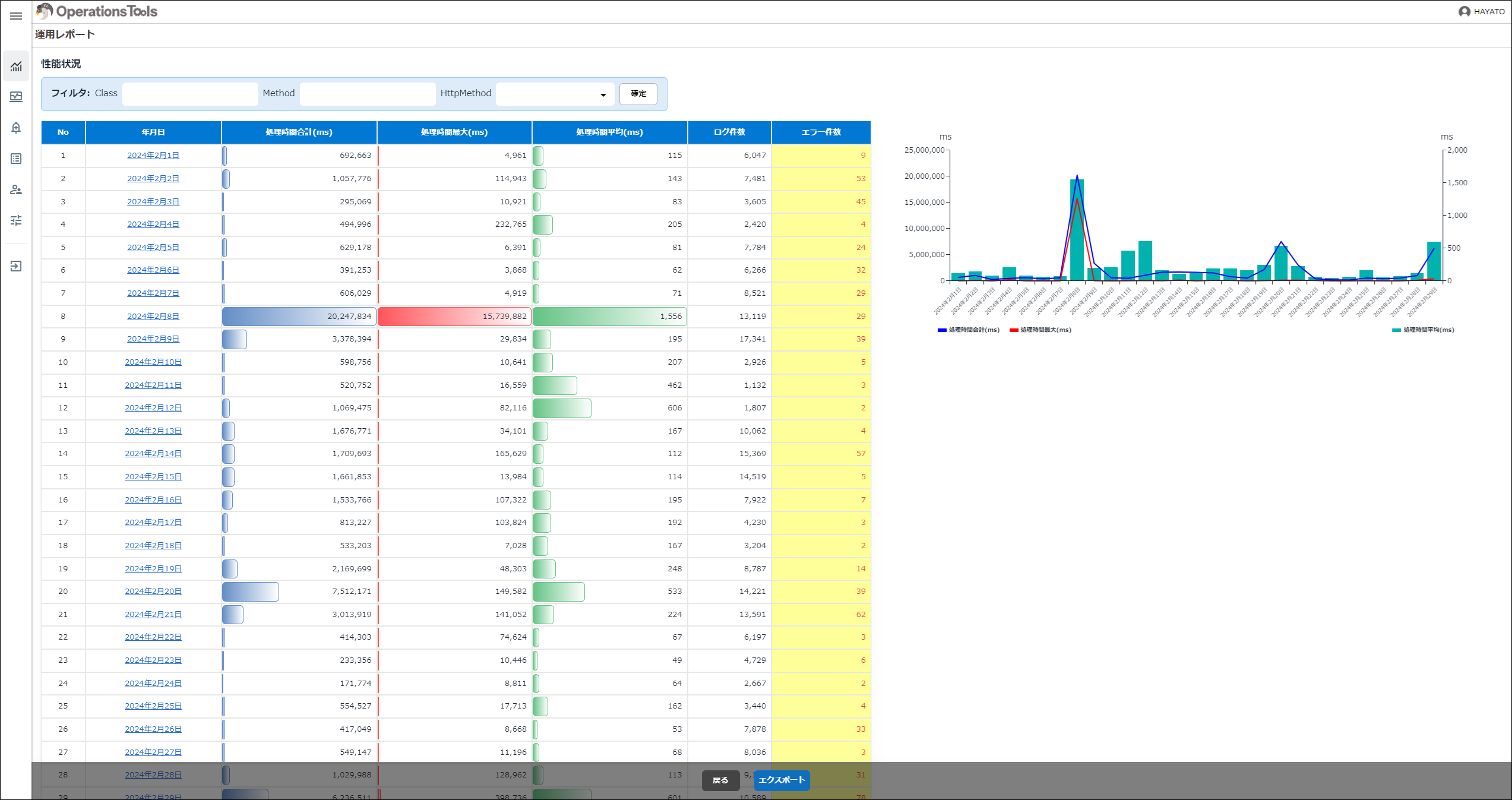
This screen lets you check Pleasanter's performance by day. You can filter by specifying "Class", "Method", and "HttpMethod". Detail rows are shown in ascending order of "Date". Clicking the "Date" link on a detail row takes you to the "Operation Report: Performance: By Hour" screen.
| Display type | Item | Description |
|---|---|---|
| Table | Date | The date is shown. |
| Table | Total Processing Time (ms) | The total processing time (ms) is shown. |
| Table | Max Processing Time (ms) | The maximum processing time (ms) is shown. |
| Table | Average Processing Time (ms) | The average processing time (ms) is shown. |
| Table | Log Count | The number of logs is shown. |
| Table | Error Count | The number of records whose ErrMessage in the Syslogs table is not null is shown. When the count is not zero, the background is yellow and the text is red. |
| Chart | General | The results aggregated by day for the year and month selected in "Operation Report: Overall (Usage / Performance)" are shown as a combination of a line chart and a bar chart. |