Performance: By Hour
Overview
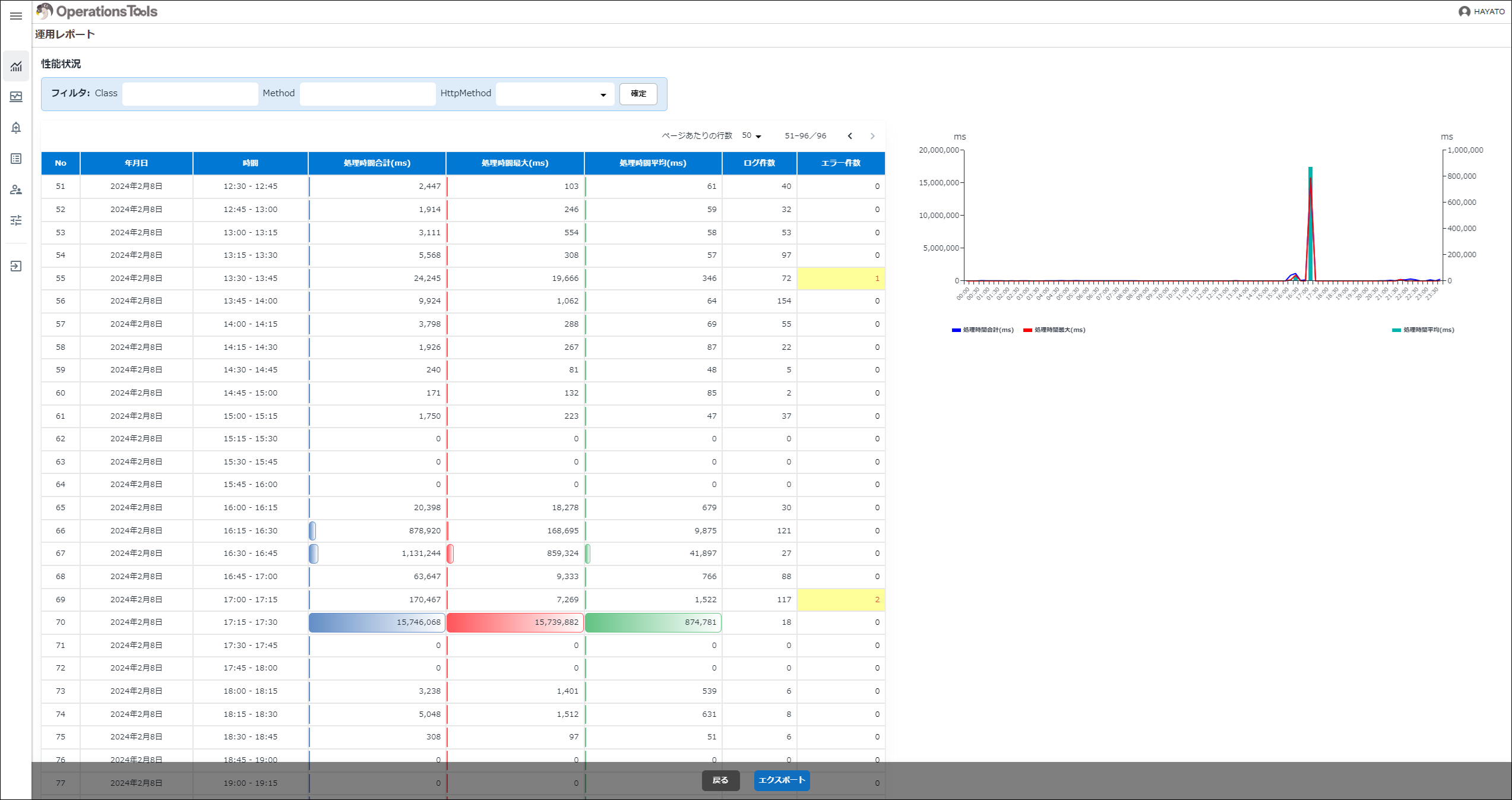
This screen lets you check Pleasanter's performance by hour (in 15-minute units). Detail rows are shown in ascending order of "Hour". You can filter by specifying "Class", "Method", and "HttpMethod".
| Display type | Item | Description |
|---|---|---|
| Table | Date | The date is shown. |
| Table | Hour | The hour is shown. |
| Table | Total Processing Time (ms) | The total processing time (ms) is shown. |
| Table | Max Processing Time (ms) | The maximum processing time (ms) is shown. |
| Table | Average Processing Time (ms) | The average processing time (ms) is shown. |
| Table | Log Count | The number of logs is shown. |
| Table | Error Count | The number of records whose ErrMessage in the Syslogs table is not null is shown. When the count is not zero, the background is yellow and the text is red. |
| Chart | General | The results aggregated by hour for the date selected in "Operation Report: Performance: By Day" are shown as a combination of a line chart and a bar chart. |