Parameter List
Overview
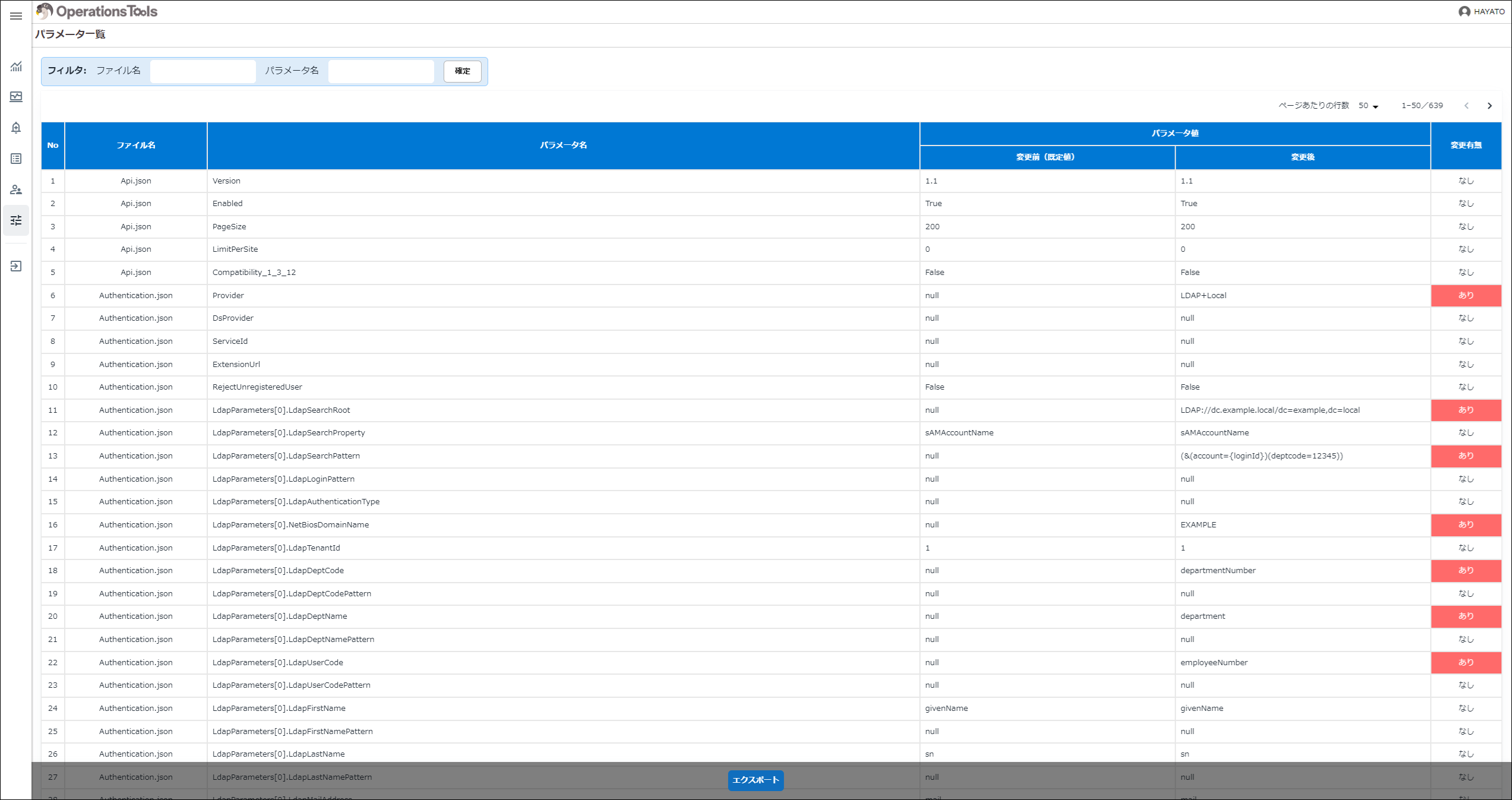
This screen lets you check the list of Pleasanter parameters and whether their setting values have been changed. The Pleasanter parameter files are in JSON format, but you can look at them in table format and export them to a CSV file. You can also filter by specifying a "File Name" and a "Parameter Name". The detail information is displayed in ascending order of "File Name", and within each file in the order in which the parameters appear.
| Display Type | Column | Description |
|---|---|---|
| Table format | File Name | The file name of the parameter is displayed. |
| Table format | Parameter Name | The parameter name is displayed. |
| Table format | Parameter Value: Before the change (default value) | The setting value of the file placed in "DefaultParametersDir" of Operations Tools is displayed. |
| Table format | Parameter Value: After the change | The setting value of the Pleasanter parameter file is displayed. |
| Table format | Changed | If the value differs between "Before the change (default value)" and "After the change", "Yes" is displayed on a red background. |
For security reasons, the parameter values of some parameters shown in the following table are displayed masked with "*".
| File Name | Parameter Name |
|---|---|
| Authentication.json | LdapParameters[0].LdapSyncPassword |
| Authentication.json | SamlParameters.IdentityProviders[0].SigningCertificate.FindValue |
| Kvs.json | ConnectionStringForSession |
| Mail.json | SmtpPassword |
| Migration.json | SourceConnectionString |
| Rds.json | SaConnectionString |
| Rds.json | OwnerConnectionString |
| Rds.json | UserConnectionString |
| Security.json | AllowIpAddresses |
| Security.json | XmlAesKey |
| Security.json | BlobContainerUri |
| Security.json | KeyIdentifier |
| Security.json | KeyFileName |
| Service.json | DefaultPassword |
Note
By placing the parameter JSON files from before the change, for the version of Pleasanter you use, under the DefaultParameters folder, you can compare the differences.Example of where to place them:
C:\web\pleasanter\Implem.Pleasanter\ExtendedLibraries\OperationsTools\App_Data\DefaultParametersIf you do not have the parameter JSON files from before the change to hand, download them from the releases page on GitHub.
https://github.com/Implem/Implem.Pleasanter/releases
Supported Versions
| Supported Version | Description |
|---|---|
| 1.3.1 and later | Changed so that, for security reasons, some parameter values are displayed masked with "*" |