Site Information List
Overview
This screen lets you check the list of Pleasanter site information. You can filter by specifying a "Site ID", a "Site Name" and a "Site Type". The detail information is displayed in ascending order of "Site ID". The "Possibility of being unused" of a site, judged automatically by the system, is also displayed as "high", "middle" or "low". When it is "high" or "middle", you can send a mail with the "Request deletion" button displayed in the "Deletion request to the site administrator" detail information.
Note
"Number of Accessing Users (recent)" and "Number of Sessions (recent)" can be checked only when you use the System Log Extended Function.
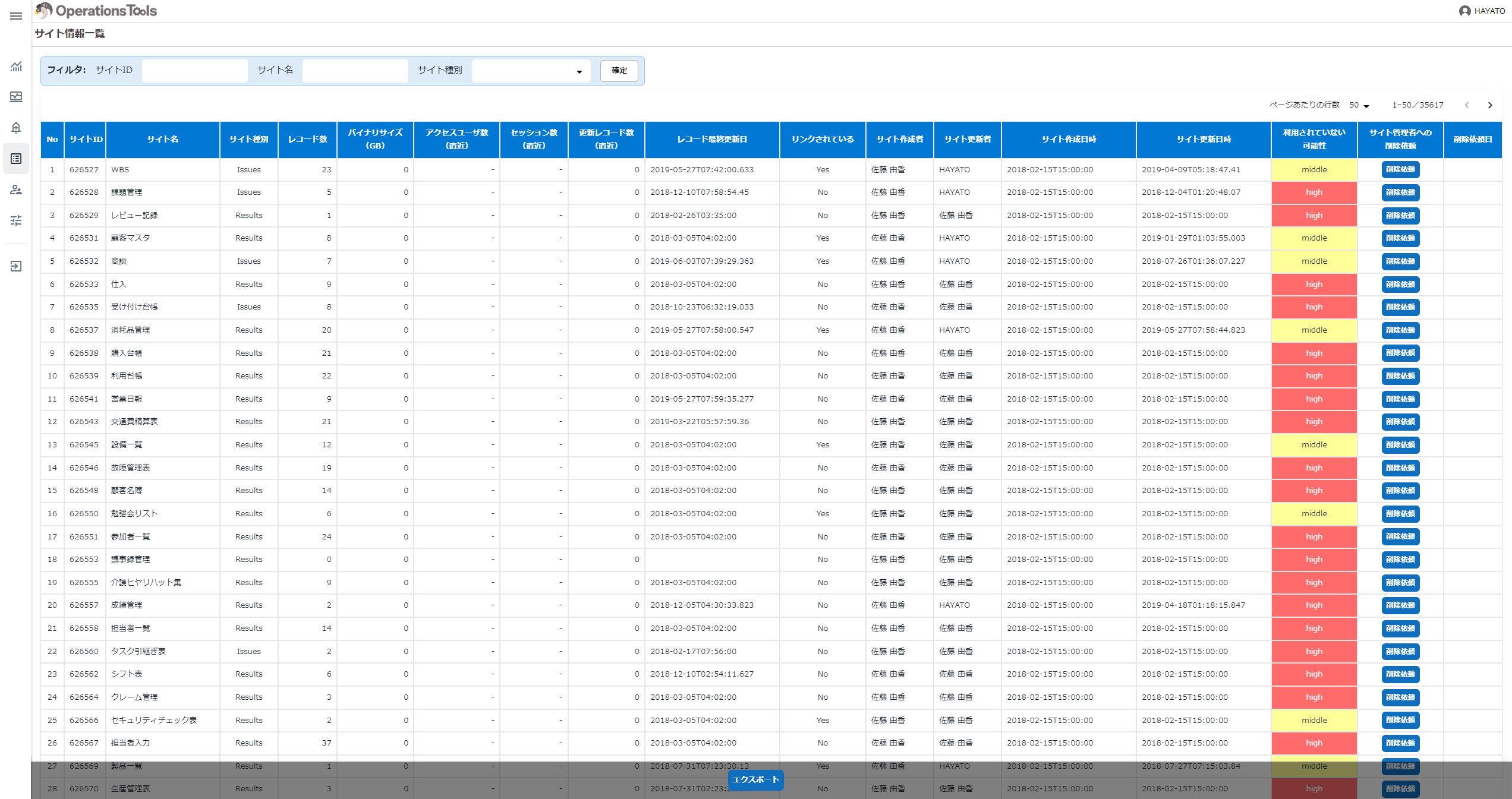
The detailed specification of "Possibility of being unused" is as follows.
- Number of updated records (recent): whether there is at least one
- Last update date of a record: whether it is within the last month
- Linked: whether it is linked from another table (whether it is used as a master)
- Site creation date and time: whether it is within the last month
- Site update date and time: whether it is within the last month
When the number of Yes above is 0: high (the possibility of being unused is high)
When the number of Yes above is 1: middle (it cannot be said either way)
When the number of Yes above is 2 to 5: low (the possibility of being unused is low)
| Display Type | Column | Description |
|---|---|---|
| Table format | Site ID | The site ID is displayed. |
| Table format | Site Name | The site name is displayed. |
| Table format | Site Type | The site type is displayed. |
| Table format | Number of Records | The number of records is displayed. |
| Table format | Binary Size (GB) | The binary size (GB) is displayed. |
| Table format | Number of Accessing Users (recent) | The number of users who accessed in the last month is displayed. |
| Table format | Number of Sessions (recent) | The number of sessions in the last month is displayed. |
| Table format | Number of Updated Records (recent) | The number of records updated in the last month is displayed. |
| Table format | Last Update Date of a Record | The last update date of a record is displayed. |
| Table format | Linked | Whether it is linked from another table by the link function of Pleasanter (whether it is used as a master) is displayed as "Yes" or "No". |
| Table format | Site Creator | The creator of the site is displayed. |
| Table format | Site Updater | The updater of the site is displayed. |
| Table format | Site Creation Date and Time | The creation date and time of the site is displayed. |
| Table format | Site Update Date and Time | The update date and time of the site is displayed. |
| Table format | Possibility of Being Unused | "high", "middle" or "low" is displayed according to the detailed specification above. |
| Table format | Deletion Request to the Site Administrator | The "Request deletion" button is displayed when "Possibility of being unused" is "high" or "middle". |
| Table format | Deletion Request Date | The date and time at which the "Request deletion" button of "Deletion request to the site administrator" was clicked is displayed. |
When you click the "Request deletion" button of "Deletion request to the site administrator", the last updater of the table settings of the target site is taken to be the site administrator, and a mail with the following content is sent to that site administrator.
Subject: [Pleasanter operation management] Request to consider deleting a site

Dear site administrator,

The Pleasanter operations staff have made a request to consider deleting a site.

If the target site below is not currently used and there is no plan to use it
in the future, please consider deleting the site.

http://{the path of Pleasanter}/items/{the target site ID}/edit

- User manual
 For the operation steps, refer to the user manual below.

 Site Function: Delete a site
 https://pleasanter.org/manual/site-delete

 Site Function: Delete a site from the trash
 https://pleasanter.org/manual/site-delete-from-trash

- About this mail
 For sites that the system automatically judged as likely to be unused,
 we ask you to consider deleting them for reasons such as the following.

 - To reduce the volume of data
 - To reduce information security risks
 - To make important information easier to reach

- Contact
 Operations staff: <the name of the operator>
 <the mail address of the operator>

* This mail is send-only.
 If you need to make an enquiry, contact the address above.
Note
Notification by mail assumes that the mail notification settings have been made in the Pleasanter parameter settings. See Set Parameter: Mail.json.