Function Overview
Overview
Pleasanter Code Assist is software that gives Pleasanter developers a comfortable development experience. It registers and updates source code such as scripts on Pleasanter at the same time as you save it in Visual Studio Code.
Features
-
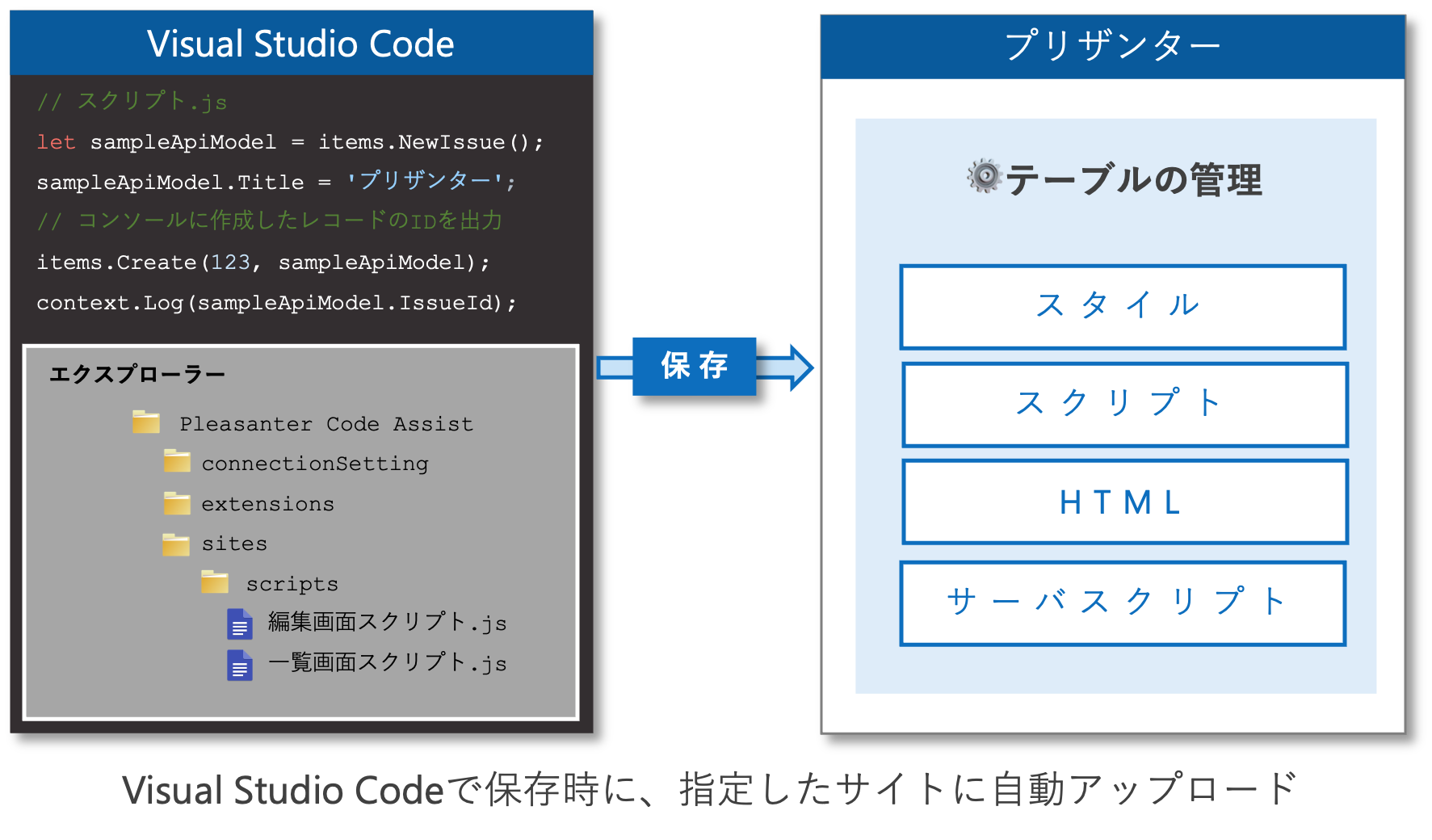
Registers and updates on Pleasanter at the same time as you save the source code in Visual Studio Code
Setting up the Script, Server Script, Styles and HTML that are central to customising Pleasanter normally means opening Manage Table, entering the script and so on, and registering or updating it. With Pleasanter Code Assist, the source code is registered or updated on the specified table at the same time as you save it in Visual Studio Code. This frees you from the bother of opening Manage Table every time you develop something, and lets you develop more comfortably using the powerful features of Visual Studio Code. You can also register and update Extended SQL, Extended Script, Extended Server Scripts and Extended Style.
-
Provided as an extension of Visual Studio Code
Pleasanter Code Assist is provided as an extension of Visual Studio Code. This means the client can develop on Windows, Linux or Mac. Other extensions can also be used as they are, so you can keep using the Visual Studio Code environment you use now. By also using the GitHub integration of Visual Studio Code, you can manage the source code more easily.
Operating Environment
Pleasanter Code Assist is provided as an extension of Visual Studio Code. You can use it in an environment where Visual Studio Code runs.
Limitations
- It cannot be used against Pleasanter Community Edition. (Except while the Pleasanter Extensions trial is in progress.)
- It cannot be used against Pleasanter.net.
- Against the demo environment, registering and updating on sites can be used. Registering and updating on the extensions table cannot be used.
- It does not work in Visual Studio Code for Web.
Prerequisites
-
To use this software, one of the following conditions needs to be met.
-
This software runs when the version of Pleasanter in the environment you use is ver.1.4.13.0 or later. If you use a version earlier than Pleasanter ver.1.4.13.0, upgrade Pleasanter.
- This software runs with Visual Studio Code ver1.95 and later. If you use a version earlier than Visual Studio Code ver1.95, upgrade Visual Studio Code.
Setup and Preparation
For the setup and preparation of Pleasanter Code Assist, refer to the following page.
List of Functions
Pleasanter Code Assist provides the following functions. For details of how to use them, refer to the following pages.
| Function Name | Overview |
|---|---|
| Site: Script | Registers and updates a script on the specified site. |
| Site: Server script | Registers and updates a server script on the specified table. |
| Site: Style | Registers and updates a style on the specified site. |
| Site: HTML | Registers and updates HTML on the specified site. |
| Extended script | Registers and updates the setting information and the script on the extensions table (the Extensions table). |
| Extended server script | Registers and updates the setting information and the server script on the extensions table (the Extensions table). |
| Extended style | Registers and updates the setting information and the style on the extensions table (the Extensions table). |
| Extended SQL | Registers and updates the setting information and the SQL on the extensions table (the Extensions table). |
About the extensions table (the Extensions table)
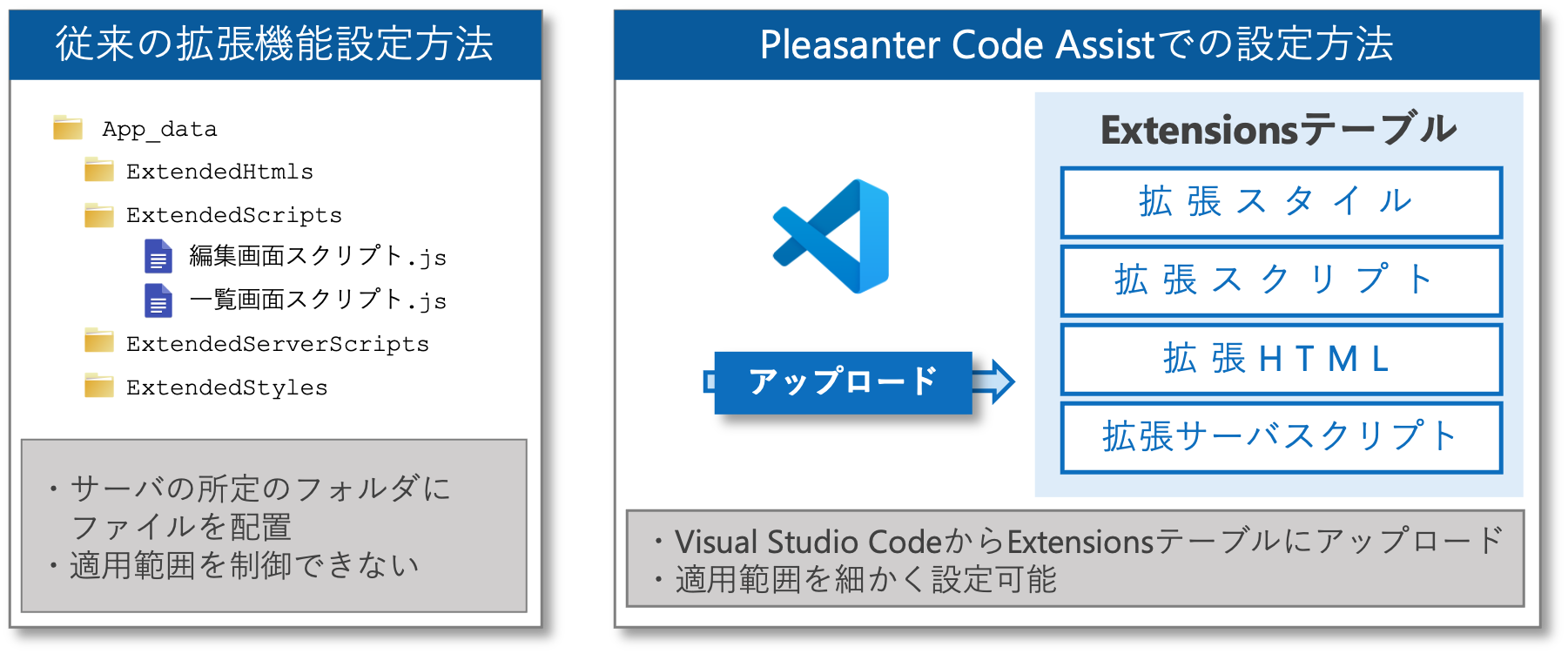
Extensions such as Extended SQL and Extended Script are normally used by placing a JSON file that contains the setting information, and the source code file, in a prescribed folder. You can also use the extensions by registering the setting information and the source code on the extensions table (the Extensions table). With Pleasanter Code Assist you can upload four kinds of extension — extended script, extended server script, extended style and extended SQL — to the extensions table (the Extensions table).
| Extension Name | Supported by Pleasanter Code Assist |
|---|---|
| Extended HTML | - |
| Extended SQL | Yes |
| Extended Server Scripts | Yes |
| Extended Script | Yes |
| Extended Style | Yes |
| Enhanced Navigation Menu | - |
| Extended Field | - |
| Extended Column | - |
With the conventional extension settings, in which extended scripts and extended styles are placed in a prescribed folder, the script or style set in the folder applies to every page of Pleasanter. When you use Pleasanter Code Assist, as with extended SQL and extended server scripts, you can specify in detail the sites, departments, groups and users it applies to.
Limitations of the extensions table (the Extensions table)
From Pleasanter version 1.4.16.0, the conditions for use have changed to strengthen security. Update to version 1.4.16.0 or later and turn on the "Allow the Extensions API" checkbox only when you need it.
Conditions for use
To use the extensions table (the Extensions table), the following conditions need to be met.
Conditions for use in version 1.4.16.0 and later
- After logging in as a privileged user, turn on the "Allow the Extensions API" checkbox on the Tenant Management screen
- Use the API key of a privileged user
Conditions for use in version 1.4.15.0 and earlier
- Use the API key of a tenant administrator
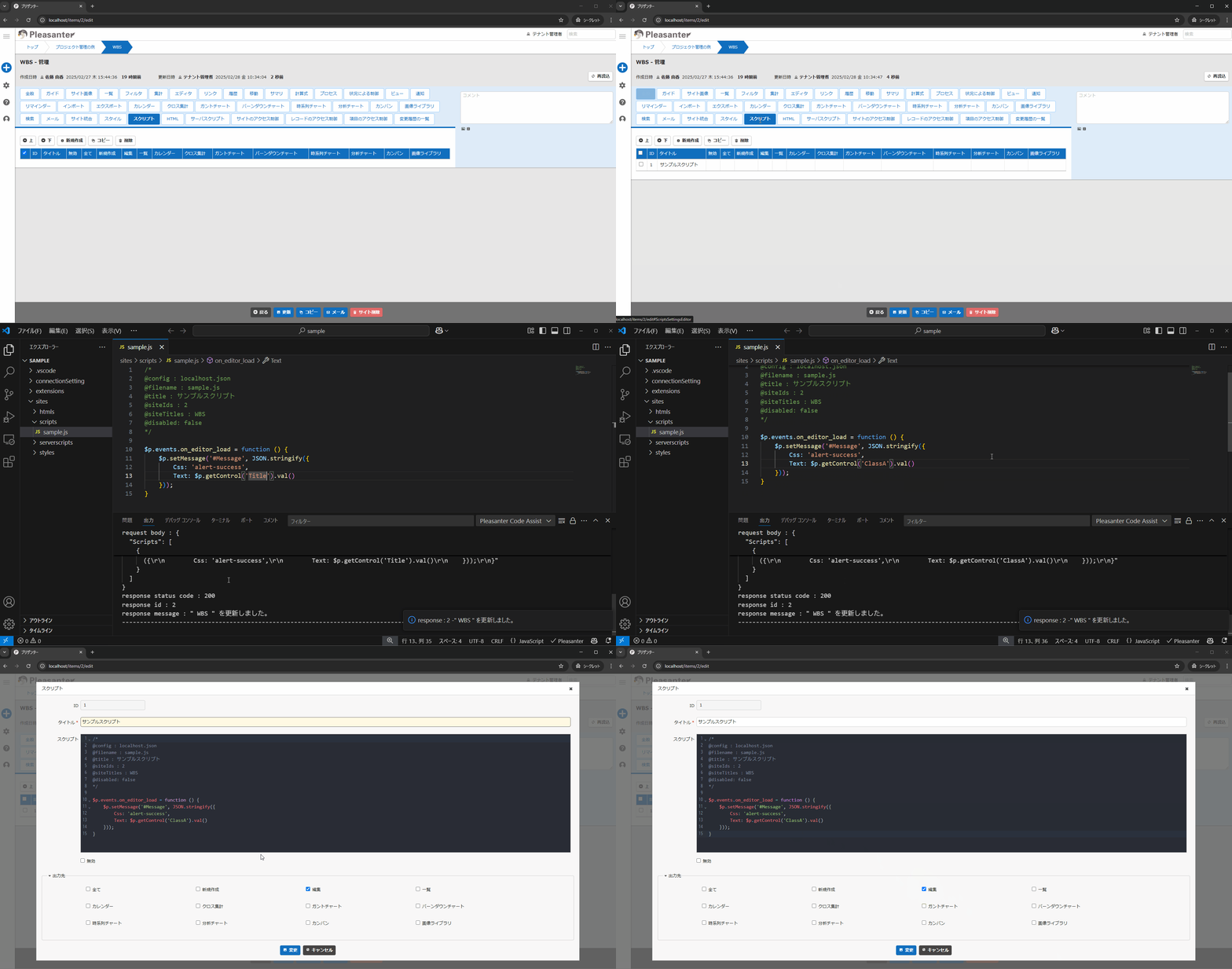
How It Works
Supported Versions
| Supported Version | Description |
|---|---|
| Pleasanter 1.4.16.0 and later | Limitations of the extensions table (the Extensions table) added |
Related Information
Pleasanter Code Assist
- Pleasanter Code Assist: Setup and Preparation
- Pleasanter Code Assist: How to Use: Sites
- Pleasanter Code Assist: How to Use: Extensions
Pleasanter Extensions Trial
Manage Table
Manage Table: Editor: Column Advanced Settings
Developer's Guide
Developer's Guide: Extensions
- Developer's Guide: Extensions: Extended SQL
- Developer's Guide: Extensions: Extended Script
- Developer's Guide: Extensions: Extended Server Scripts
- Developer's Guide: Extensions: Extended Style
- Developer's Guide: Extensions: Enhanced Navigation Menu
- Developer's Guide: Extensions: Extended Field
- Developer's Guide: Extensions: Extended Column
-
For Enterprise Edition, refer to the service specification of the "Pleasanter Annual Support Service". ↩