Suppress Concurrent Execution of Bulk Operations on Large Amounts of Data on the Same Table


Overview
If processes that operate on large amounts of data in bulk, such as import and bulk update, run at the same time on one table, the database may come under a high load and the processes may take a very long time, which can degrade the performance of the whole system. This feature stabilizes the performance of the whole system by suppressing the concurrent execution of bulk operations on large amounts of data on one table.
Configure it with the "BlockSiteTaskWhileRunning" parameter of General.json. Set it to true to enable this feature.
Cautions
- To apply changes to the parameter file, you need to restart the application.
Limitations
- This feature suppresses concurrent execution on the same table. It does not suppress concurrent execution on different tables.
- Subscribers of the former plans (Mini, Light, Standard, Premium) are not eligible.
Specifications
Target Sites
This feature applies to time-limited tables and record tables.
Target Operations
This feature applies to the following operations. If you try to run them at the same time on the same table, the one that runs later is blocked.
| Run from | Operation | Description |
|---|---|---|
| Screen | "Bulk update" | Updates multiple records at once on the list screen |
| Screen | "Bulk delete" | Deletes multiple records at once on the list screen |
| Screen | "Import" | Imports data from a CSV file on the list screen |
| Screen | "Summaries" synchronization | Recalculates the summary selected on the "Summaries" tab of "Manage Table" |
| API | "Bulk create and update API" | Creates or updates multiple records at once through the API |
| API | "Bulk delete API" | Deletes multiple records at once through the API |
| API | "Import API" | Imports data from a CSV file through the API |
| API | "Export API" | Outputs data to a file through the API |
| API | "Summary synchronization API" | Recalculates a summary through the API |
| Script | "$p.apiBulkDelete" | Deletes multiple records at once with a script |
| Server script | items.BulkDelete | Deletes multiple records at once with a server script |
| Server script | $ps.file.import | Imports data from a CSV file with a server script |
| Server script | $ps.file.export | Outputs data to a file with a server script |
How It Works
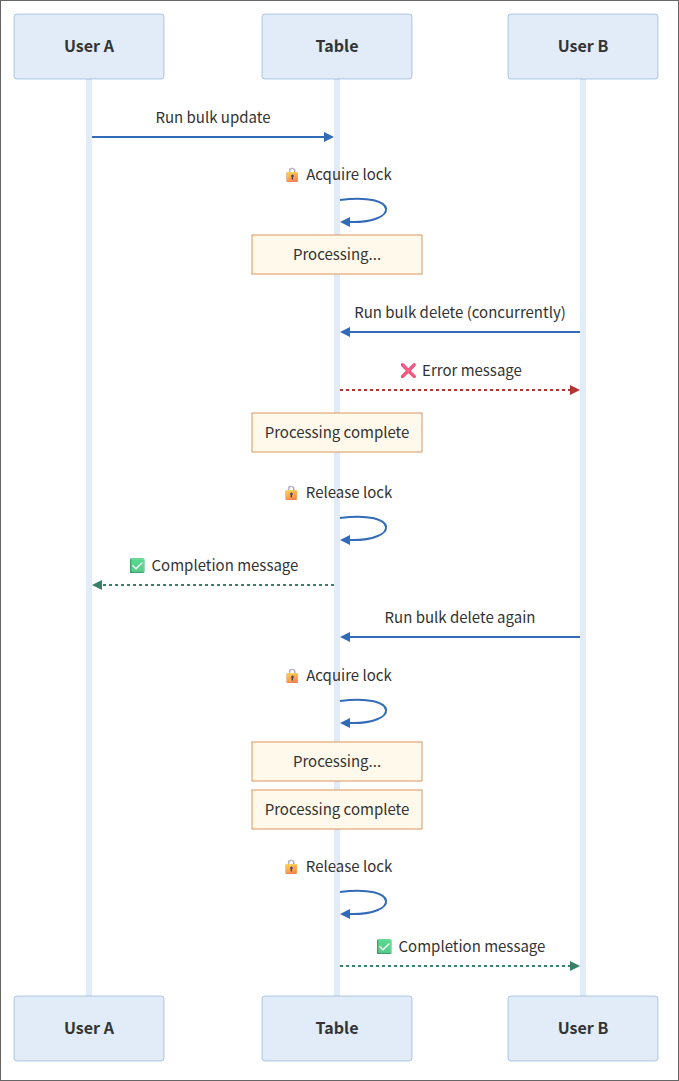
- When the process that started first finishes, the lock is released automatically
- Even if a process stops partway, the lock is released automatically after 120 seconds (the next operation does not stay stuck)
Error Messages
When an operation is blocked by this feature, the following error message is displayed or returned.
Screen Operations
The error message "Another task is being processed, please execute it later." is displayed at the bottom of the screen.
API and Scripts
HTTP status code 429 is returned as the API response.
Server Scripts
-
items.BulkDelete
0 is returned. -
$ps.file.import
The error message "Another task is being processed, please execute it later." is displayed at the bottom of the screen. -
$ps.file.export
The error message "Another task is being processed, please execute it later." is displayed at the bottom of the screen.
Supported Versions
| Supported versions | Body |
|---|---|
| 1.4.12.0 and later | Added the feature |