Settings for Storing Attached Files in Local Storage in a Cluster Configuration
Prerequisites
- The "cluster" on this page is a cluster of web servers, not a cluster of database servers.
Overview
Configure Pleasanter so that attached files can be uploaded and registered correctly in a cluster environment.
This page explains what to do when you choose local storage as the storage method for attached files. For the case where you choose database storage, refer to Additional: Ready for Clustering: Settings for Uploading and Registering Attached Files.
As shown below, this page assumes that there are two servers on which Pleasanter is installed (Web Server 1 and Web Server 2).
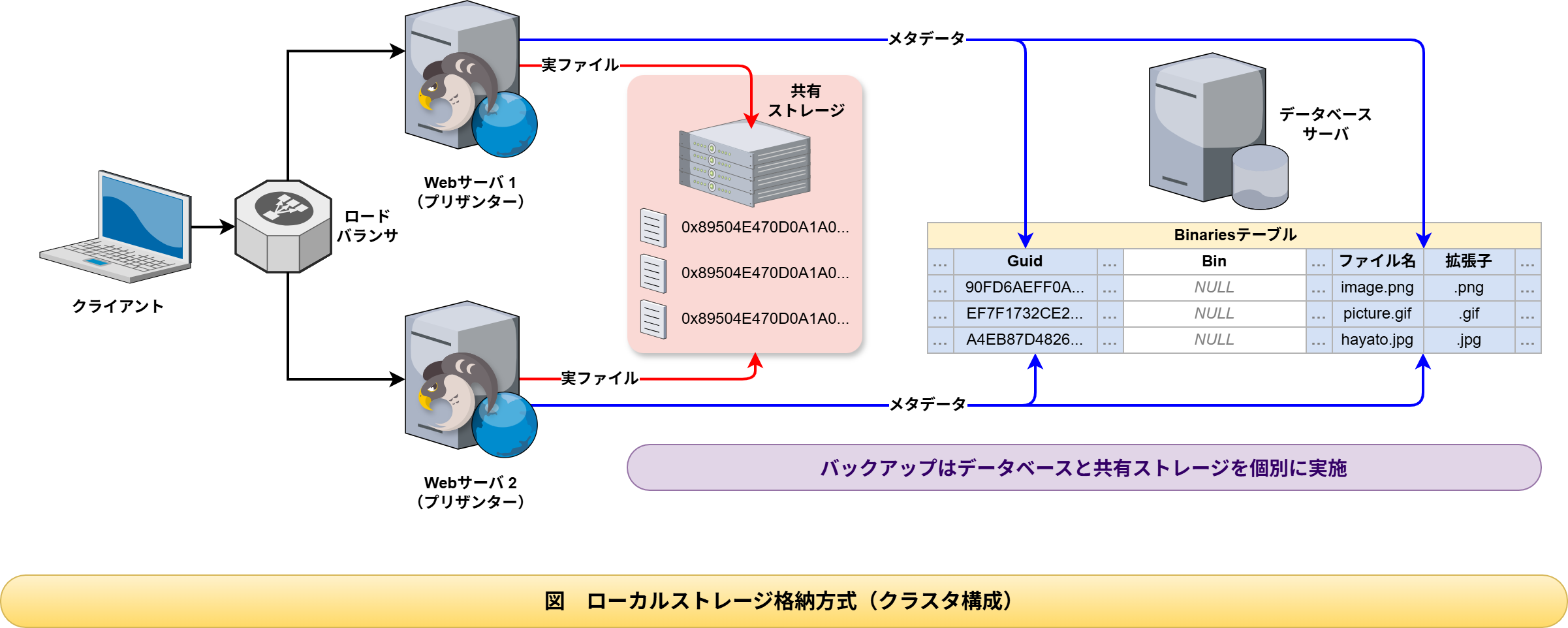
Operation Procedure
- Log in to Web Server 1.
- Open the configuration file "BinaryStorage.json".
- Set the value of the parameter "Provider" to "local" and save the file.
- Restart Pleasanter.
- Do the same for Web Server 2, following steps 1 to 4 above.
Note that when you choose local storage (Local) in a cluster configuration, access from multiple web servers to shared storage is required. Configure the shared storage so that it can be accessed from every web server with the same path.
Clustering Support for Background Services
For clustering support for background services, refer to the following manuals.
- Additional: Ready for Clustering: Configuring Background Services for Multiple Instance Setup
- Additional: Ready for Clustering: Settings for Uploading and Registering Attached Files
- Quartz.json