Configuring Background Services for Multiple Instance Setup
Overview
This feature enables Pleasanter's background services to support multi-instance configurations.
For example, consider a configuration where two servers running Pleasanter (multiple instances) are placed between a load balancer and a database. When the reminder function is enabled on each instance, the following issues occur:
With Standard Configuration
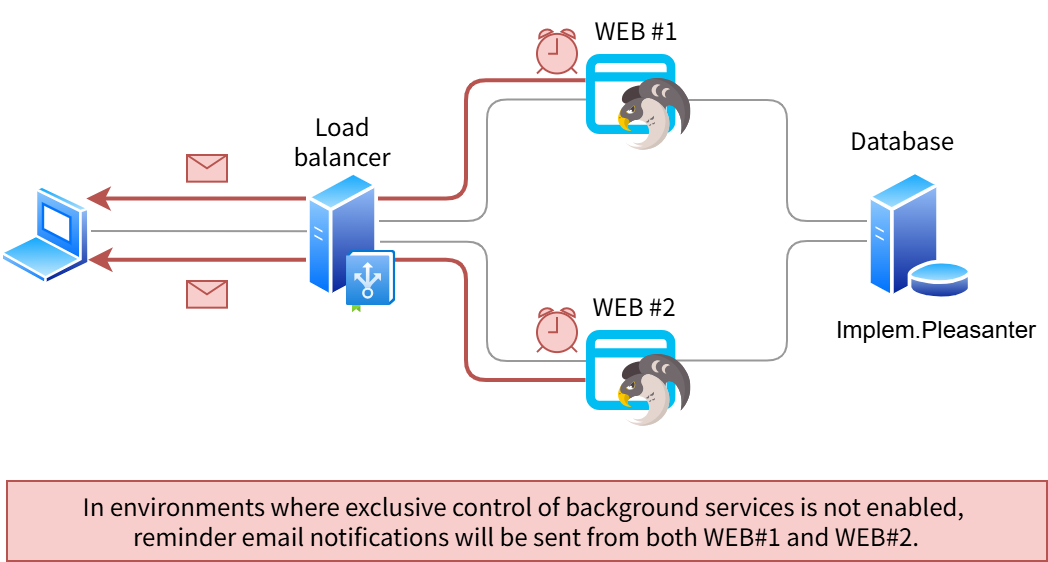
Reminders are executed on each instance, resulting in unnecessary duplicate email transmissions.
When Background Services are Configured for Multi-Instance Support on Each Instance
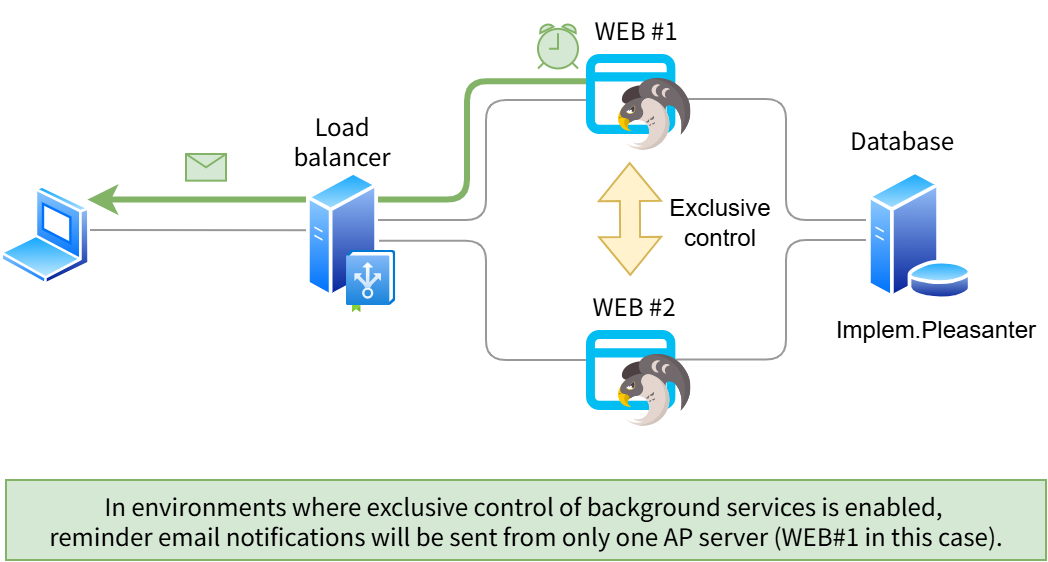
Reminders are executed on only one instance, preventing unnecessary duplicate email transmissions.
Background Services Supporting Multi-Instance Configuration
The background services that support multi-instance configuration are as follows:
-
Services that will be executed on only one server in a multi-instance environment with this configuration:
Service Name Parameter File Parameter Name Background Server Script "Script.json" BackgroundServerScript Reminder "BackgroundService.json" Reminder LDAP Synchronization "BackgroundService.json" SyncByLdap System Log Deletion "BackgroundService.json" DeleteSysLogs Trash Record Deletion "BackgroundService.json" DeleteTrushBox Delete unused permissions and link information related to records in the Recycle bin BackgroundService.json DeleteUnusedRecord Mcp Log Deletion "BackgroundService.json" DeleteMcpLogs -
Services that will continue to be executed on all servers in a multi-instance environment after this configuration:
Service Name Parameter File Parameter Name Temporary File Deletion "BackgroundService.json" DeleteTemporaryFiles
Cautions
- For operations in multi-instance configurations, we recommend a configuration with session persistence enabled (session affinity / sticky sessions) to ensure stable operation.
- This explanation assumes an environment with multiple servers running Pleasanter as backends of a load balancer (LB).
Prerequisites
- When using SQL Server without an TLS server certificate as the database, such as in development environments, add TrustServerCertificate=True; to the connection information such as SaConnectionString.
Example:
For Implem.Pleasanter_Rds_SQLServer_SaConnectionString:
- For operations in multi-instance configurations, please also implement "Settings for Attachment File Upload and Registration."
Configuration Steps
By executing the following procedures, Pleasanter's background services will support multi-instance configurations. After executing this procedure, 11 tables beginning with "QRTZ_" will be created.
Parameter configuration must be performed on all AP servers in the multi-instance configuration.
- Set the value of the parameter "Enabled" in the "Quartz.json" to true.
2. Execute "CodeDefiner."
Supported Versions
| Supported Version | Description |
|---|---|
| Version 1.4.22.0 | Feature added |