Common Function: Start Guide
Overview
The "Start Guide" is shown below the "Breadcrumb list" on the "Top screen".
The "Start Guide" shows links to various content that helps you make the most of Pleasanter.
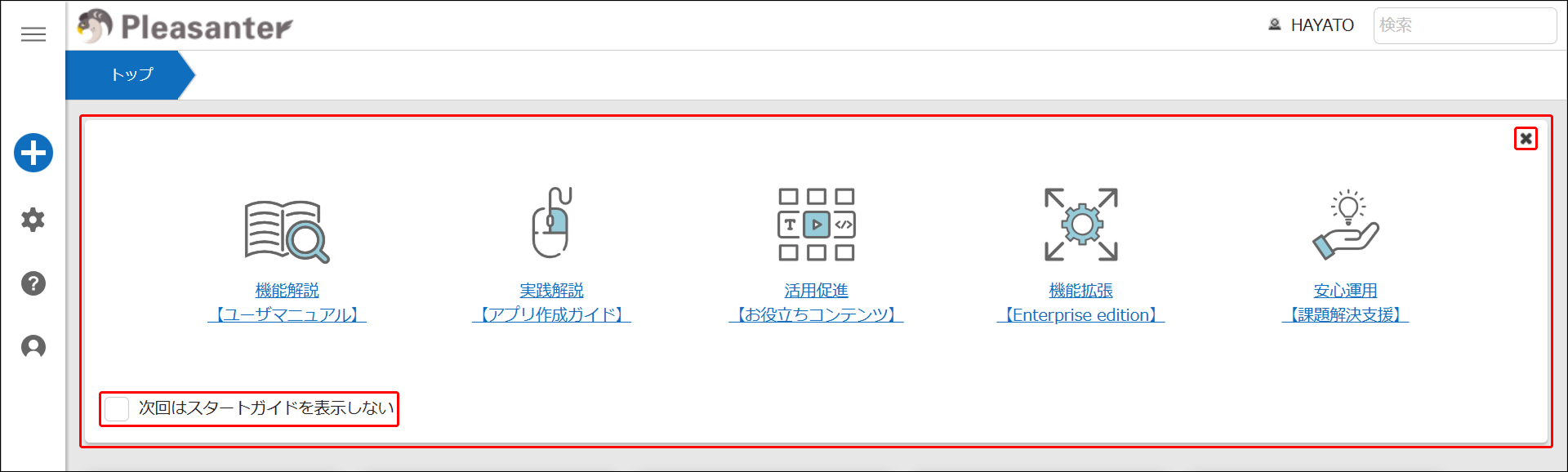
Showing and hiding the Start Guide
The "x" button
Clicking the "x" button at the top right of the guide closes the Start Guide.
The "Do not show the Start Guide next time" checkbox
When enabled, the Start Guide is no longer shown from the next time onward, and "Show Start Guide" appears under "User" in the navigation menu.
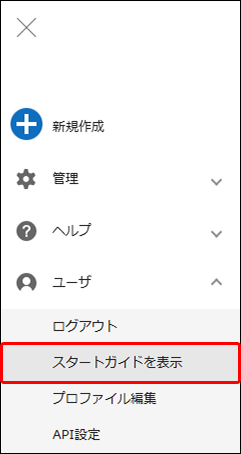
Selecting "Show Start Guide" displays the Start Guide again.
If you close the guide with the "x" button at the top right without checking "Do not show the Start Guide next time", the Start Guide is shown again the next time you open the top screen.
Supported Versions
| Supported version | Description |
|---|---|
| 1.5.2.0 and later | Changed the design and the content shown in the Start Guide |