Common Function: Version
Overview
Displays information such as the Pleasanter version and license.
Operation Procedure
- Click "Version" from the "Help" menu in the navigation menu.
- The version will be displayed.
Example of the version screen (for Community Edition)

Example of the version screen (during a Pleasanter Extensions Trial)

Example of the version screen (for Enterprise Edition)
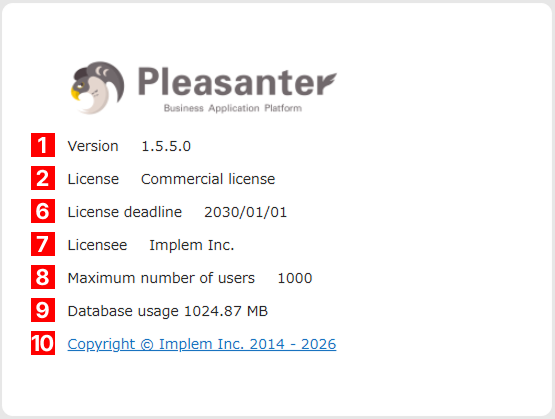
Screen Items List
| No. | Screen Items Name | Description |
|---|---|---|
| 1 | Version | This is the Pleasanter version. |
| 2 | License | This is Pleasanter's license. For the Community Edition and during the Pleasanter Extensions Trial, clicking this will display a page explaining the AGPL. Please refer to FAQ about AGPL for more information about Pleasanter's license. |
| 3 | Pleasanter Extensions Trial | This is only displayed during the Pleasanter Extensions Trial. |
| 4 | Trial period | This is only displayed during the Pleasanter Extensions Trial. This displays the trial expiration date. |
| 5 | Switch to commercial license | This is displayed for the Community Edition and during the Pleasanter Extensions Trial. Clicking it will display the extended content information page. |
| 6 | License deadline | This is displayed only in Enterprise Edition. This displays the trial expiration date. Whether this is displayed can be specified in the Version.json settings. |
| 7 | Licensee | This is displayed only in Enterprise Edition. This displays the name of the license holder. Whether this is displayed can be specified in the Version.json settings. |
| 8 | Maximum number of users | This is displayed only in Enterprise Edition. This displays the maximum number of users. Whether this is displayed can be specified in the Version.json settings. |
| 9 | Database usage | When you log in as a privileged user, you can check the current data usage on the version screen. For details, please refer to FAQ: I want to check DB usage. |
| 10 | Copyright | This is Pleasanter's copyright notice. Clicking it will display Implem Inc.'s homepage. |
Display Conditions for Screen Items
| Screen Items Name | Community Edition | Pleasanter Extensions Trial | Enterprise Edition |
|---|---|---|---|
| Version | ○ | ○ | ○ |
| License | ○ | ○ | ○ |
| Pleasanter Extensions Trial | × | ○ | × |
| Trial period | × | ○ | × |
| Switch to commercial license | ○ | ○ | × |
| License deadline | × | × | ○※1 |
| Licensee | × | × | ○※1 |
| Maximum number of users | × | × | ○※1 |
| Database usage | ○※2 | ○※2 | ○※2 |
| Copyright | ○ | ○ | ○ |
※1 Whether this is displayed can be specified in the Version.json settings.
※2 This can only be checked when logged in as a privileged user.
Related Information
Pleasanter Extensions Trial
Version.json
FAQ: I want to check the version of Pleasanter
FAQ: I want to check DB usage
FAQ about AGPL