Advanced Operation: Notification, Reminder
Notification
"Notification" is a function that automatically notifies users by email or communication tools such as Teams, Slack, and Chatwork when you create, update, or delete a record, or perform an operation set in the "Process" function.
Notification types
The tools that can be used for notifications are as follows. You can select the ones enabled in "Notification.json". To use them, you need to set up the appropriate settings for each tool. If you want to notify by email, you also need to set up email sending.
| Notification types | Description |
|---|---|
| Notify by email. The destination email address can be specified directly or dynamically set from the screen. | |
| Slack | Notify Slack. The destination will be the specified channel. |
| ChatWork | Notify Chatwork. The destination will be the specified group chat. |
| LINE | Notify LINE. The destination will be the specified individual user. |
| LINE Group | Notify LINE. The destination will be the specified LINE group. |
| LINE WORKS | Sends notifications to LINE WORKS. The notification destination will be the specified talk room. |
| Teams | Notify Teams. The destination will be the specified channel. |
| Rocket.Chat | Notify Rocket.Chat. The destination will be the specified channel. |
| InCircle | Notify InCircle. The destination will be the chat of the specified API user. |
| HTTP Client | You can send any request using the HTTP client. |
Notification timing
You can set the notification timing from the following options. You can also set detailed conditions by combining it with a view.
| Notification timing | Description |
|---|---|
| After create | You will be notified after creating a new record on the edit screen. |
| After update | You will be notified after updating a record on the edit screen. |
| After delete | You will be notified after deleting a record on the edit screen. |
| After copy | You will be notified after copying a record on the edit screen. |
| After bulk update | You will be notified after bulk updating records on the list screen. |
| After bulk delete | You will be notified after bulk deleting records on the list screen. |
| After import | You will be notified after importing records on the list screen. |
Also, if you set notifications in the "Process" function, you will be notified at the specified time in addition to the notifications set in the process.
Reminder
"Reminder" function is a function that reminds users at a specified time and frequency for records whose due date has passed or whose due date is approaching within a specified range.
How reminders work
The key to understanding how reminders work is the following settings and "Status" values.
Settings Column
| Column name | Description |
|---|---|
| Column | Date column to be used as the basis for reminders. You can select any date column, not just "Completed" in a time-limited table. Reminders can also be set for recorded tables. This date and status value will determine whether the record is a target for a reminder. |
| Range | The period for which the reminder will be performed. If you specify 10, the range will be 10 days including the current day. The current day is counted as 1 day, so "reminders will be sent for incomplete records whose date falls within 9 days from today". |
"Status" value
By default, a value of 900 or more is defined as "Completed". This includes Completed (900) and Pending (910). The value considered to be completed (default value: 900) can be changed in "CompletionCode" in "General.json".
Example of a reminder target
If the column is set to DateA and the range is set to "10", the determination of the reminder target as of 8/15/2023 is as follows.
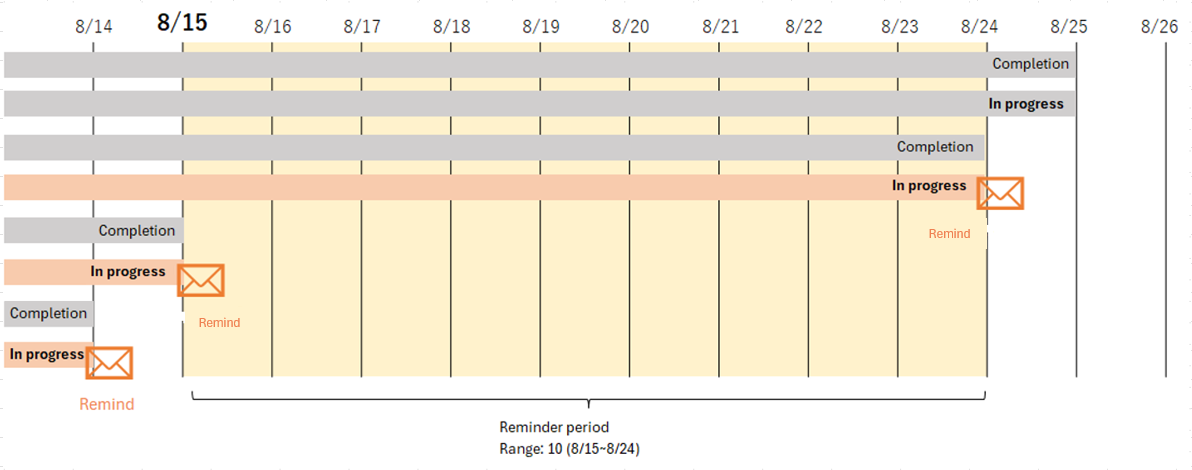
| DateA | Status | Reminder | Reason |
|---|---|---|---|
| 2023/8/25 | Completed (900) | Not applicable | Due to completion |
| 2023/8/25 | In progress (200) | Not applicable | Outside range (10 days from 8/15 to 8/24) |
| 2023/8/24 | Completed (900) | Not applicable | Due to completion |
| 2023/8/24 | In progress (200) | Applicable | Within range (10 days from 8/15 to 8/24) and incomplete |
| 2023/8/15 | Completed (900) | Not applicable | Due to completion |
| 2023/8/15 | In progress (200) | Applicable | Within range (10 days from 8/15 to 8/24) and incomplete |
| 2023/8/14 | Completed (900) | Not applicable | Due to completion |
| 2023/8/14 | In progress (200) | Applicable | Incomplete in the past |
Reminder notification timing
The key column for specifying the notification timing are "Start Date and Time" and "Period Type".
Start date and time
The date and time when the reminder will start. Please be careful when entering a future date, as the reminder will not be executed before the specified date and time.
Period type
Specify the repeat period. The available columns are as follows.
| Period type | Description |
|---|---|
| Daily | Execute every day at the same time specified as the start date and time |
| Weekly | Execute once a week at the same time on the day of the week specified as the start date and time |
| Week/Day | Execute once a month at the same time on the day of the week of the xxth week specified as the start date and time |
| Monthly | Execute once a month at the same time on the day specified as the start date and time |
| End of month | Execute once a month at the same time on the last day of the month on the day specified as the start date and time |
| Yearly | Execute once a year at the same time on the day specified as the start date and time |
Specific examples of notification timing
If the start date and time are set to 01:00:00 on Thursday, August 3, 2023, the notification timing for each period type as of 9:00 on August 15, 2023 will be as follows.
| Period type | Next reminder date and time | Description |
|---|---|---|
| Daily | 2023/8/16 1:00:00 | Execute every day at 1:00:00 |
| Weekly | 2023/8/17 1:00:00 | Execute on the next Thursday, 2023/8/17 |
| Week/Day | 2023/9/7 1:00:00 | 2023/8/3 is the first Thursday of the week, and 2023/9/1 is a Friday, so execute on 2023/9/7, the first Thursday |
| Monthly | 2023/9/3 1:00:00 | Execute on 2023/9/3, the 3rd of the next month |
| End of month | 2023/8/31 1:00:00 | Execute on 2023/8/31, which is the last day of the month after 2023/8/3 |
| Yearly | 2024/8/3 1:00:00 | Execute on 2024/8/3, which is 8/3 of the following year |
Reminder type
The following tools can be used for reminder notifications. You can select the ones enabled in "Reminder.json".
| Reminder type | Description |
|---|---|
| Notify by email. The destination email address can be specified directly or dynamically set from the screen. | |
| Slack | Notify Slack. The destination will be the specified channel. |
| Chatwork | Notify Chatwork. The destination will be the specified group chat. |
| LINE | Notify LINE. The destination will be the specified individual user. |
| LINE Group | Notify LINE. The destination will be the specified LINE group. |
| LINE WORKS | Sends notifications to LINE WORKS. The notification destination will be the specified talk room. |
| Teams | Notify Teams. The destination will be the specified channel. |
| Rocket.Chat | Notify Rocket.Chat. The destination will be the specified channel. |
| InCircle | Notify InCircle. The destination will be the chat of the specified API user. |
httpClient cannot be selected for Reminder.