Site Function: Site Copy
Overview
Copy the settings in the administration screen by copying the target site (Site, Table, Wiki, Dashboard).
Limitations
- Records in tables cannot be copied.
- "Change History" cannot be copied.
Prerequisites
- You need the "Site Administration Permission".
Operation Procedure
The following is the procedure for copying tables. The same procedure applies to copying other folders, etc.
1. Open the record list screen and open the navigation menu "Manage" - "Manage Table".

1. Click the "Copy" button at the bottom of the screen.

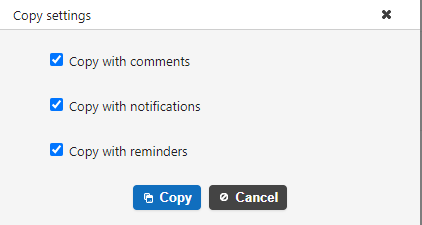
1. A pop-up will appear asking you to set up the copy. If you want to copy the original site including comments, check "Copy with comments". If you want to copy the notification and reminder including settings, check "Copy with notifications" and "Copy with reminders." If you do not need them, uncheck them. Then click the "Copy" button.
1. When the message "Copied" appears at the bottom of the screen, the process is complete.
