Editor: Column: Date
Overview
This article explains the column editing dialog for "Date" in "Smart Design". For details on "Date Column", please refer to the following page.
Manage Table: Items: Date
Settings
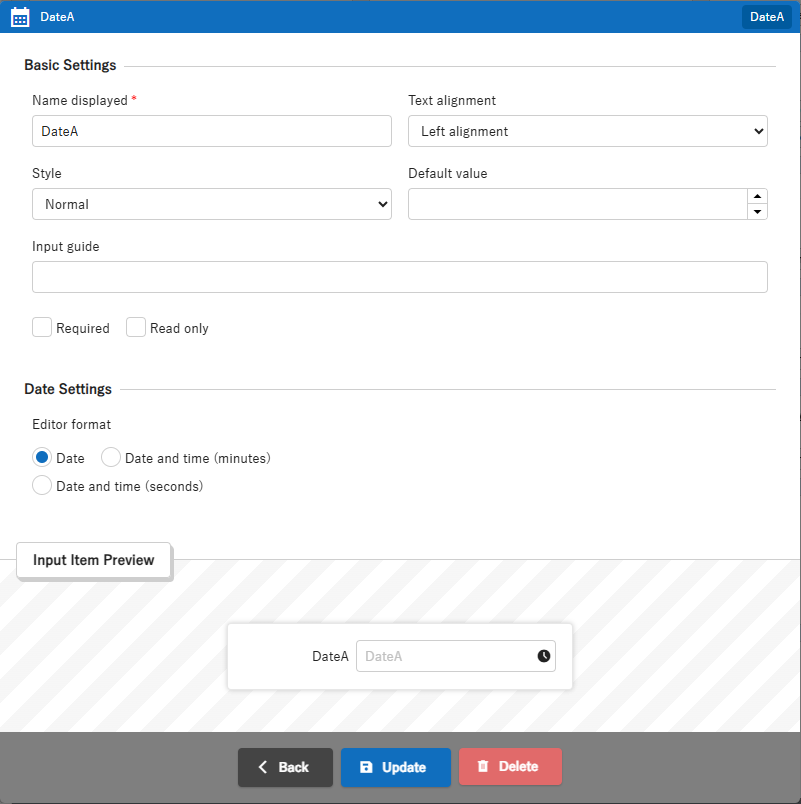
| Column | Summary | Notes |
|---|---|---|
| Name Displayed | Set the string to be displayed as the label of the column | For details, see Manage Table: Editor: Column Advanced Settings: Name Displayed |
| Text Alignment | Set the horizontal alignment (left or right) of the column body | For details, see Manage Table: Editor: Column Advanced Settings: Alignment |
| Style | Set the style (normal, wide) of the input column | For details, see Manage Table: Editor: Column Advanced Settings: Input Column Style |
| Default Value | Set the default value of the "Input column" when "Create New" a record. " | For details, see Manage Table: Editor: Column Advanced Settings: Default Value |
| Input guide | Set the input guide for text input column | For details, see Manage Table: Editor: Column Advanced Settings: Input Guide |
| Required | Set this if you want the "Input column" to be "Required" in the Editor | For details, see Manage Table: Editor: Column Advanced Settings: Input Required |
| Read only | Set this if you want the "Input column" to be displayed in "Read only" in the editor | For details, see Manage Table: Editor: Column Advanced Settings: Read-only |
| Editor format | Set the input format for the editor's date column to "Date only" or "Date and time" | For details, see Manage Table: Editor: Column Advanced Settings: Editor Format |
| Time interval (minutes) | Set the range of times that can be selected in the calendar control | For details, see Manage Table: Editor: Column Advanced Settings: Time Interval (Minutes) |
Regarding deletion:
Please note that if you delete a date column card from the layout, any changes you have made to the settings will be reset.
Supported Versions
| Supported versions | Body |
|---|---|
| 1.4.15.0 and later | Added function |
Related Information
Manage Table: Editor: Column Advanced Settings: Name Displayed
Manage Table: Editor: Column Advanced Settings: Alignment
Manage Table: Editor: Column Advanced Settings: Input Column Style
Manage Table: Editor: Column Advanced Settings: Default Value
Manage Table: Editor: Column Advanced Settings: Input Guide
Manage Table: Editor: Column Advanced Settings: Input Required
Manage Table: Editor: Column Advanced Settings: Read-only
Manage Table: Editor: Column Advanced Settings: Editor Format
Manage Table: Editor: Column Advanced Settings: Time Interval (Minutes)
- Date
- Manage Table: Items: Date
- Manage Table: Editor: Column Advanced Settings: Name Displayed
- Manage Table: Editor: Column Advanced Settings: Alignment
- Manage Table: Editor: Column Advanced Settings: Input Column Style
- Manage Table: Editor: Column Advanced Settings: Default Value
- Manage Table: Editor: Column Advanced Settings: Input Guide
- Manage Table: Editor: Column Advanced Settings: Input Required
- Manage Table: Editor: Column Advanced Settings: Read-only
- Manage Table: Editor: Column Advanced Settings: Editor Format
- Manage Table: Editor: Column Advanced Settings: Time Interval (Minutes)