Table Function: View And Update Records
Overview
Use the "Editor" to view or update table records.
Limitations
- There is no view-only screen.
- If the table is locked, the "Update" button is not displayed and operations cannot be performed.
- If the record is locked, the "Update" button is not displayed and operations cannot be performed.
- The "Update" button is not displayed and operations cannot be performed for read-only records.
- If an update conflict occurs for the same record, the message "Cannot update because XXXX has updated it first. Please reload." is displayed. In that case, save the input column to a text editor or similar as necessary, click the "Reload" button, and edit again.
Prerequisites
- "Read Permission" is required.
- "Update Permission" is required to update a record. If you only have "Read Permission", it will be read-only.
Operation Procedure
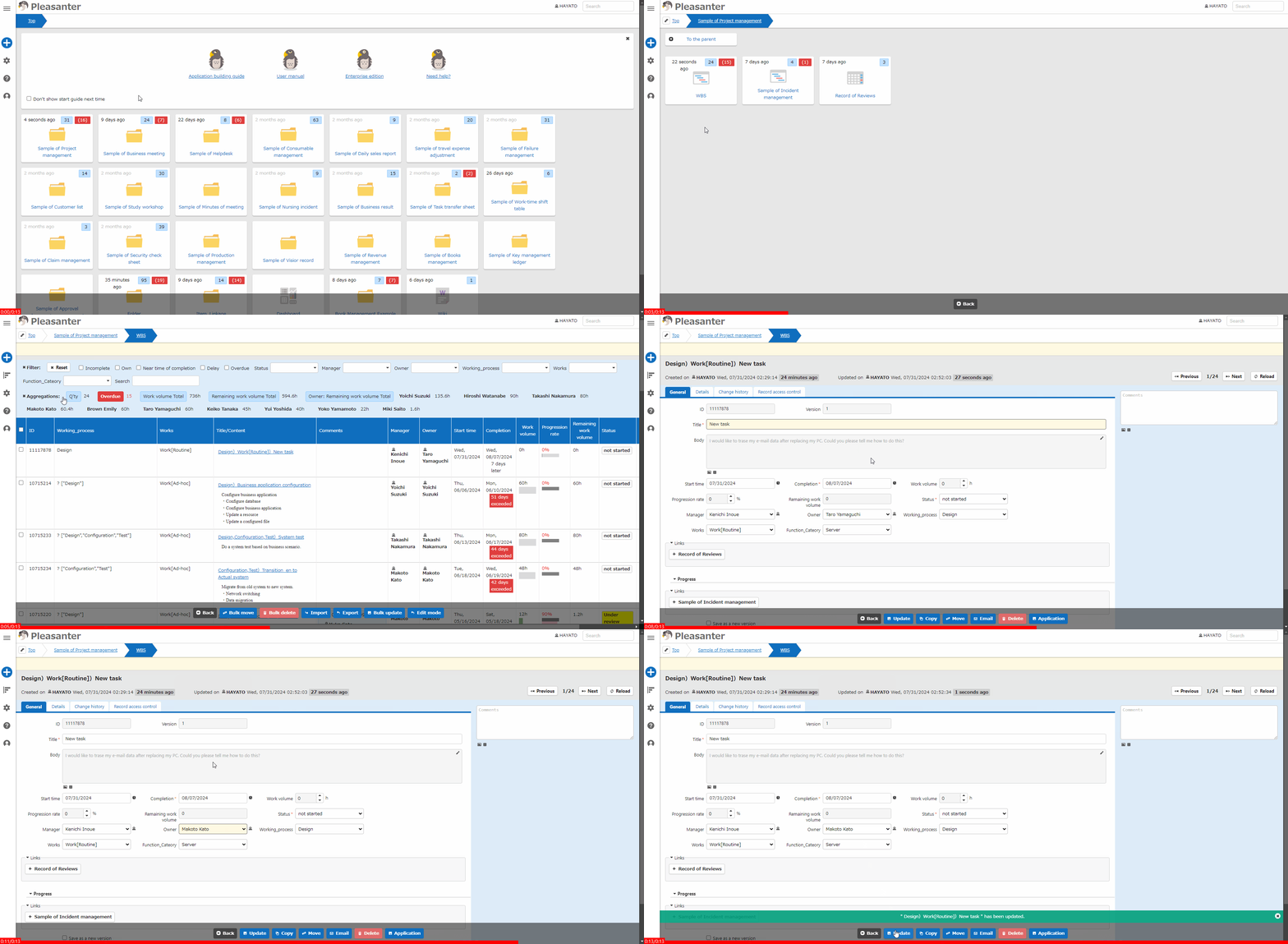
- Go to the target table.
- Search for the target record from the "List Screen".
- Click the target record.
- The "Editor" will be displayed, so edit the data.
- Click the "Update" button.
- If ""xxxx" has been updated" is displayed, the process is complete. The record title will be displayed in place of xxxx.