Table Function: Lock Record
Overview
Locks a table record so that it cannot be edited. When a record is locked, changes such as updating or deleting the record cannot be made.
Cautions
- Only the locked user or "Privileged User" can release the lock. Please be cautious when locking so as not to interfere with other users' editing operations.
Limitations
- If the table is locked, the "Update" button will not be displayed and the operation cannot be performed.
- The "Update" button is not displayed and operations cannot be performed for read-only records.
Prerequisites
- "Read Permission" and "Update Permission" are required.
- The "Lock" column must be enabled in the editor.
- "Update Permission" for the "Lock" column is required.
Operation Procedure
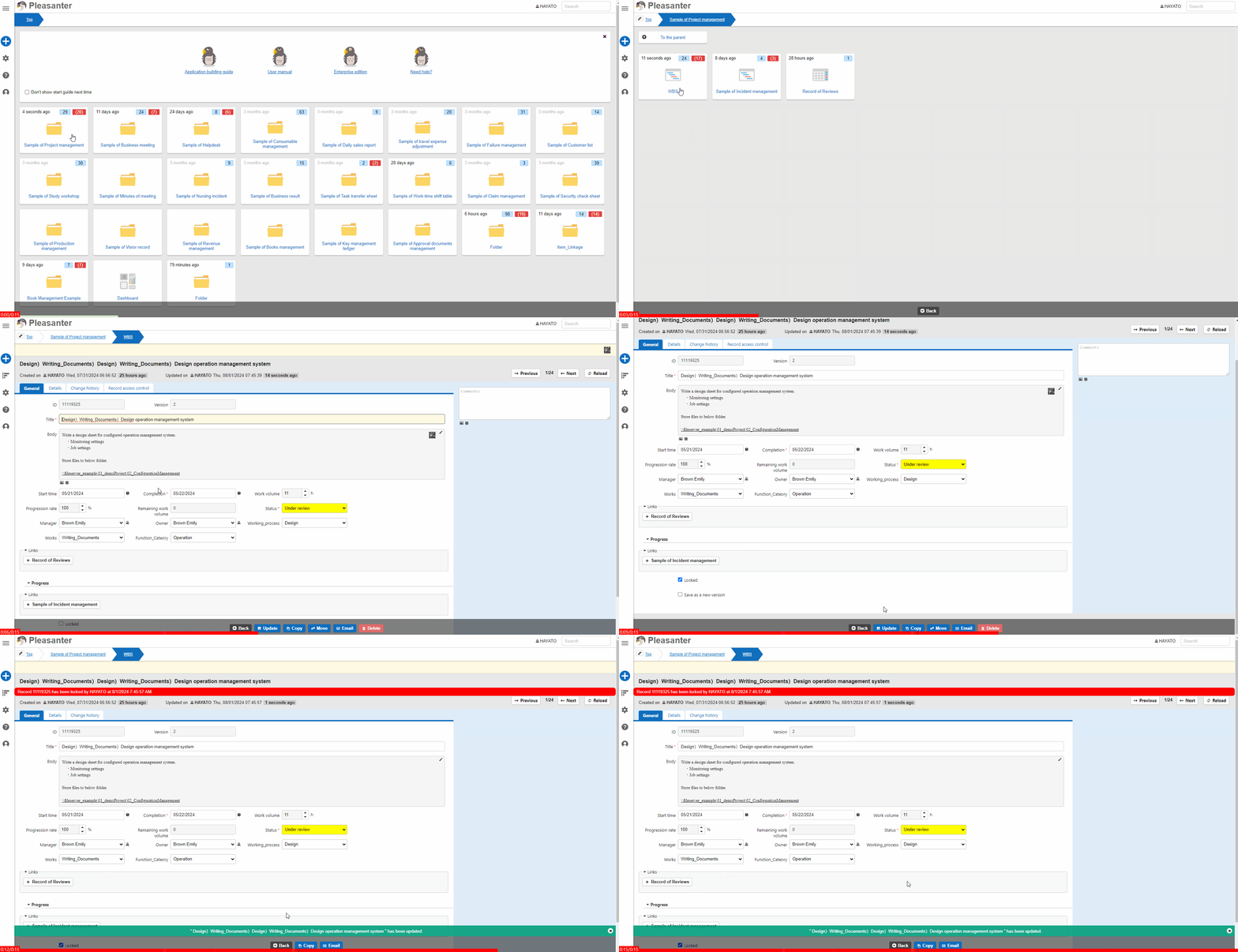
- Go to the target table.
- Search for the target record from the "List Screen".
- Click the target record.
- Check the "Lock" column.
- Click the "Update" button.
- The process is complete when the message ""xxxx" has been updated" is displayed and the top of the screen displays "Record nnnn was locked by uuuu on
yyyy/MM/dd HH:mm:ss". xxxx displays the record title. nnnn displays the record ID. uuuu displays the name of the user who operated.yyyy/MM/dd HH:mm:ssdisplays the date and time the record was locked.
Record Lock Behavior
| Operations | Behavior |
|---|---|
| Update, move, delete, divide on the edit screen | The buttons for the operations disappear and operations cannot be performed |
| Update and delete via API | 405 (Method Not Allowed) error occurs and operation is not possible |
| List edit | Locked records are not in editable state and cannot be edited |
| Bulk update, bulk delete, bulk move | If locked records are included in the target, they are checked in advance and no updates are performed. In the case of bulk update of locked column, if locked records other than the record you locked are included in the target, they are checked in advance and no updates are performed |
| Import | If locked records are included in the update target, they are checked in advance and no imports are performed |