Wiki Function: Restore From Change History
Overview
You can restore the contents of a specific version from the change history of a Wiki. The contents of the specified version are restored as the latest version, and the contents of the latest version before the operation remain in the change history. Restoring increases the version by one.
Limitations
- You can restore only one version at a time.
- If "Restore" in "History.json" is false, the "Restore" button is not displayed and you cannot perform this operation.
Prerequisites
- "Read Permission" and "Update Permission" are required.
Operation Procedure
- Click the target Wiki in the site list.
- Click the "Change history" tab.
-
Select the check box to the left of the row of the version you want to restore, and click the "Restore" button.
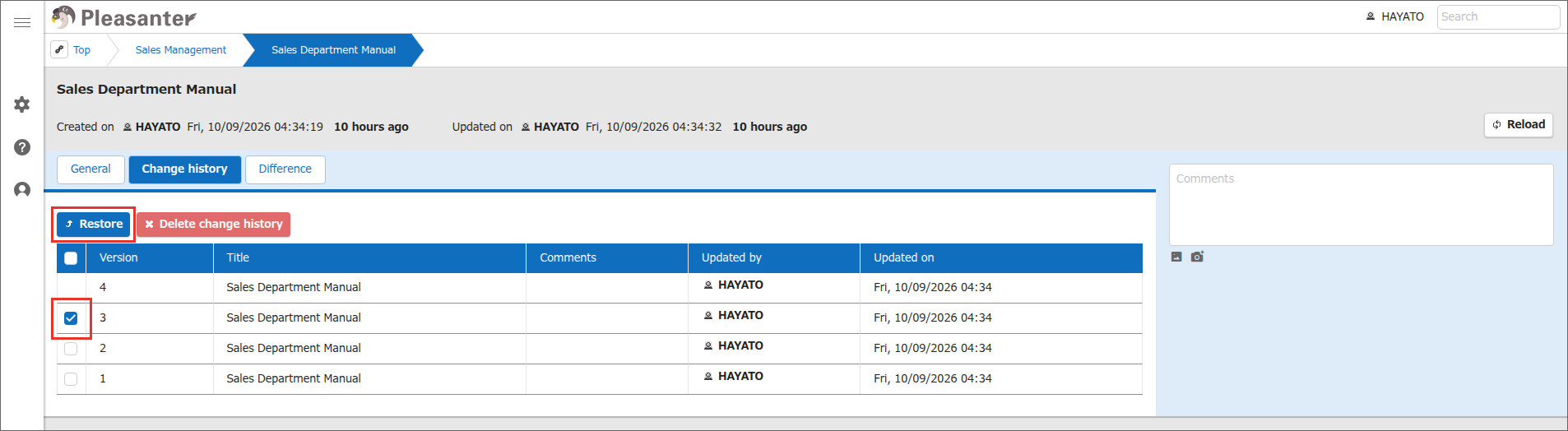
-
A confirmation message is displayed. Click "OK".
- When "Restored from version n." is displayed, the operation is complete. n is the version number restored from.